1-Visitor
November 27, 2013
Solved

Decimal Places Change

  • November 27, 2013
  • 5 replies
  • 34306 views

Hi Folks,

Is ther any option to change decimal places for all dimesions in one shot?
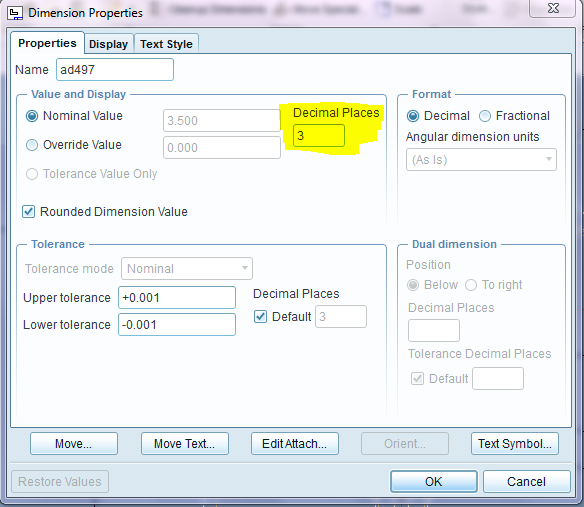
Capture.PNG

Best answer by TomD.inPDX

Nope, it is set in the model configurations.

I set mine to 4 in the model and when I create a drafting dimension, it is 4 decimal placed by default.

I have this in my config.pro

default_dec_places 4

5 replies

1-Visitor
November 27, 2013

Mark all dimensions. Then:

Layout -> Format -> Decimal Place

You can also use the Searchbar top right.

17-Peridot
November 27, 2013

default_dec_places

value (default = 2 for non-angular dimensions)

sets the default number of decimal places (0-14) to be displayed in all model modes for non-angular dimensions. it does not affect the displayed number of digits of dimensions as modified using numdigits. the number of decimal places of dimensions created in sketcher is controlled by the option sketcher_dec_places.

config.pro options

AraviK11-VisitorAuthor
1-Visitor
November 28, 2013

Thanks for the reply both Nico Tonnhofer and Antonius Dirriwachter. I tried both options but its not not working for me. by the way at present i am working on WF 5.0

AraviK11-VisitorAuthor
1-Visitor
November 28, 2013

We can modify decimal places at one shot by using manual method.

selecting all dimensions--->

Right Click---->

Properties---->

Change Decimal places---->

OK

But i am looking for Default change "drawing options".

I hope you all clear with my doubt.

Thanks

AraviK

17-Peridot
November 28, 2013

Nope, it is set in the model configurations.

I set mine to 4 in the model and when I create a drafting dimension, it is 4 decimal placed by default.

I have this in my config.pro

default_dec_places 4

AraviK11-VisitorAuthor
1-Visitor
November 28, 2013

Yes Got it.

Thanks Antonius Dirriwachter.

AraviK11-VisitorAuthor
1-Visitor
November 28, 2013

Tools--->

Options--->

default_dec_places--->

OK

1.PNG

2.PNG

Thanks

AraviK

17-Peridot
November 28, 2013

Yep

I use 4 places by default so I can see the results of fractions or whatever reason the 4th digit accuracy is invoked. However my drawings all use 2 and 3 decimal places. It forces me to evaluate every dimension to know that they are nominally correct.

For instance, I may use 5/16 as an entry value which is .3125 and on a drawing, it should be .312 or .313. I make sure that my model and drawing are exactly the same so I edit the value in the model to be correct to the number of digits on the drawing.

I learned this when an employer that wanted to have every dimension with its own tolerance instead of relying on a title block tolerance. This forces you to think about every dimension. A bit overkill but I understand the principle.

However, these practices do force you to edit every dimension. In the grand scheme of things, it it not so bad. It really does make you be better engineer in the long run. ...and you get respect from the manufacturer that uses your model since the -drawing- is the "contractual" master to them, and they should agree 100%.

AraviK11-VisitorAuthor
1-Visitor
November 28, 2013

Yep ,

I agree with you Antonius Dirriwachter.

AraviK
