1-Visitor
Jul 12, 2014 10:14 AM UTC
Solved

difficulty understanding reference planes

i have gone through books but could not under stand what is reference plane in sketcher menu..can someone give me a better understanding of what is a reference plane....thanks in advance...
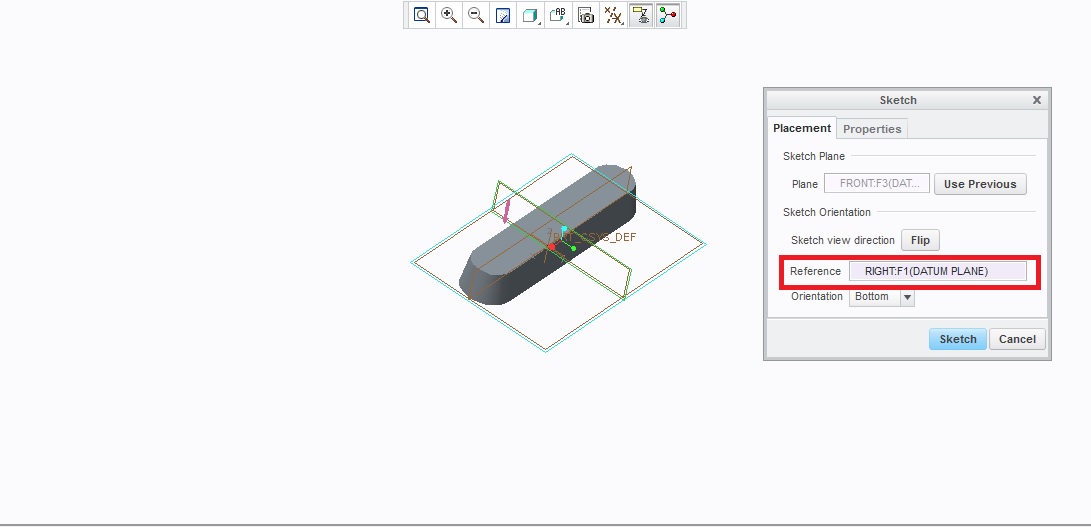

Untitled.jpg

15-Moonstone
Jul 12, 2014 11:48 AM UTC

the reference plane decides the orientation of the sketching plane.

the reference plane can be datum plane or flat surface.

Creo(Pro/E) selects them automatically but you can select your own reference plane to orient the sketch the way you want..

Many time when the sketching plane is selected and when you enter the sketcher environment, the skecthing orientation is not the way you had desired, this happen because Creo (Pro/E) selects an automatic plane for orientation..but this you can change and re-orient so that sketching plane orients the way you like.

4 replies

15-Moonstone
Jul 12, 2014 11:48 AM UTC

the reference plane decides the orientation of the sketching plane.

the reference plane can be datum plane or flat surface.

Creo(Pro/E) selects them automatically but you can select your own reference plane to orient the sketch the way you want..

Many time when the sketching plane is selected and when you enter the sketcher environment, the skecthing orientation is not the way you had desired, this happen because Creo (Pro/E) selects an automatic plane for orientation..but this you can change and re-orient so that sketching plane orients the way you like.

Translate
1-Visitor
Jul 12, 2014 12:25 PM UTC

i did not undertand sir....can u elaborate with suitable pictures or links

Translate
StephenW
23-Emerald III
Jul 12, 2014 1:07 PM UTC

In your example picture, the 'RIGHT' plane is the reference or orientation plane and it is set to 'BOTTOM' so that orients the sketcher so that the brown side of the plane it on the bottom. If you set the 'RIGHT' plane as the reference and set it 'TOP', the brown side of the plane will be on the top.

brown-bottom.jpg

brown-top.jpg

Translate