

1-Visitor
April 9, 2014
Solved

Having trouble closing the welcome tab when opening parameteric

  • April 9, 2014
  • 2 replies
  • 960 views

I just recently downloaded the student version of Creo Parametric 2.0. But when I open a model the welcome tab stays active and I can't see my model. If I click the close button on the welcome tab the tab just freezes. What do I need to get the welcome tab to close?
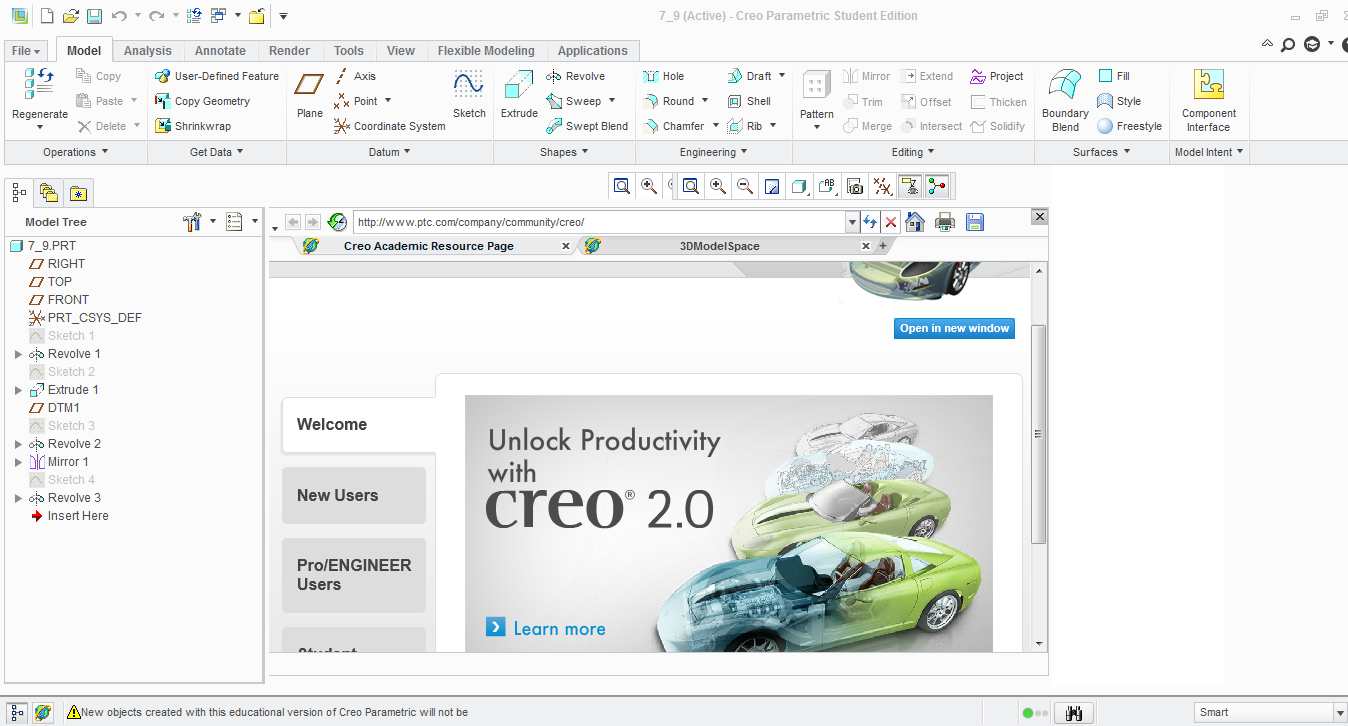

Creo.PNG

    Best answer by Mahesh_Sharma

    Jacob,

    As Martin mentioned this issue looks to be related to graphics. You can try below steps to make it working.

    1. Right Click on Shortcut icon for Creo > Properties

    2. Move the cursor to right end in target and at the end add a space followed by -g:win32_gdi (e.g. "C:\PTC\Creo 2.0\Parametric\bin\parametric.exe" -g:win32_gdi)

    3. Apply > Ok

    4. Launch Creo 2.0

    Good Luck.

    2 replies

    24-Ruby III
    April 9, 2014

    Jacob,

    click the icon located in bottom left corner (2-nd one).

    If you will see empty graphic window, then probably your graphic card is not the right one. Try to add the following option at the end of config.pro file and restart Creo.

    graphics win32_gdi

    Martin Hanak

    Mahesh_Sharma
    22-Sapphire I
    April 9, 2014

    Jacob,

    As Martin mentioned this issue looks to be related to graphics. You can try below steps to make it working.

    1. Right Click on Shortcut icon for Creo > Properties

    2. Move the cursor to right end in target and at the end add a space followed by -g:win32_gdi (e.g. "C:\PTC\Creo 2.0\Parametric\bin\parametric.exe" -g:win32_gdi)

    3. Apply > Ok

    4. Launch Creo 2.0

    Good Luck.