

1-Visitor
December 8, 2013
Solved

help how do close the internal browser that opens with the programme?"

  • December 8, 2013
  • 1 reply
  • 1378 views

Creo 2 loads on a laptop that meets minimum spec BUT I can not close out the browser to get to the work area and start work. The IT revs at work have tried a number of things found in support documents but still no joy. I need to complete a number of pre-course tasks for a course on Wednesday this week so would appreciate a prompt reply!
Best answer by TomD.inPDX

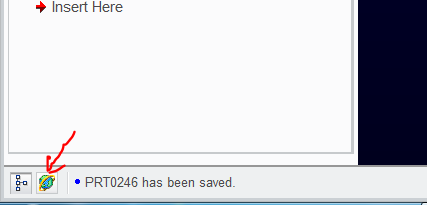
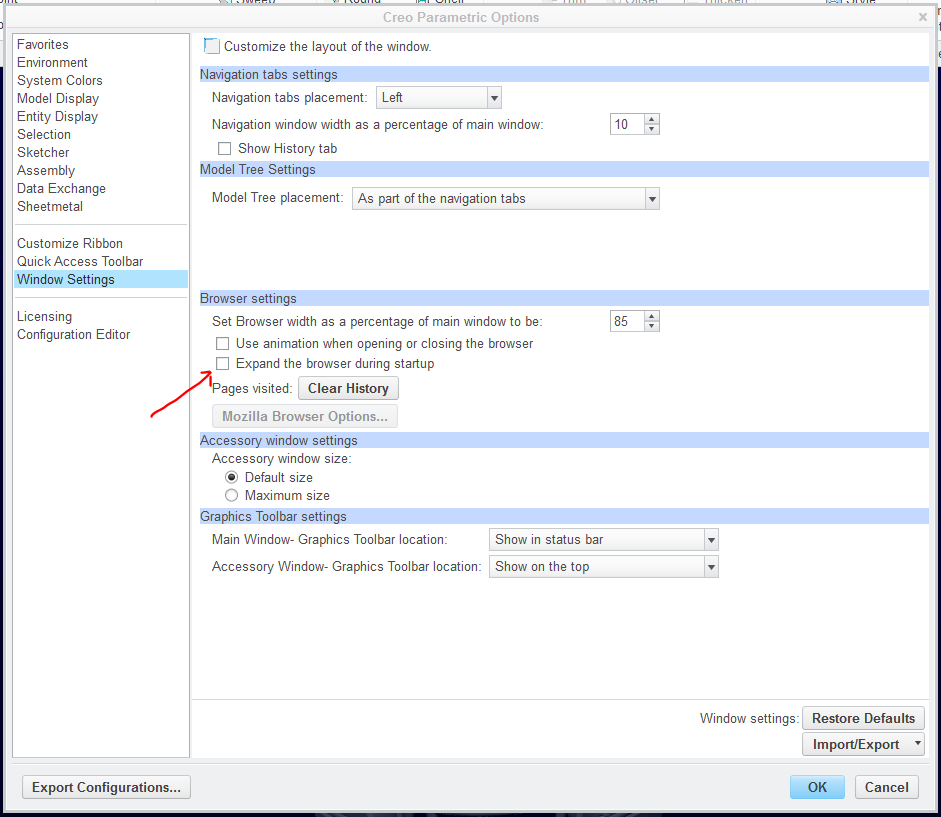
One of these should work for Creo:

browser_toggle.PNG

browser_toggle_II.PNG

I don't see this option in config.pro so it is likely part of the toolbar settings which is saved for all sessions even after upgrades are installed.

1 reply

17-Peridot
December 9, 2013

One of these should work for Creo:

browser_toggle.PNG

browser_toggle_II.PNG

I don't see this option in config.pro so it is likely part of the toolbar settings which is saved for all sessions even after upgrades are installed.

17-Peridot
December 9, 2013

And welcome to the forum, Peter!

PeterSach1-VisitorAuthor
1-Visitor
December 9, 2013

Cheers Antonius,

I've quickly tried the toggle icon and will try the option settings between classes!

Many thanks

Peter