1-Visitor
February 29, 2016
Solved

Hole Table

  • February 29, 2016
  • 2 replies
  • 4620 views

Hello everyone,

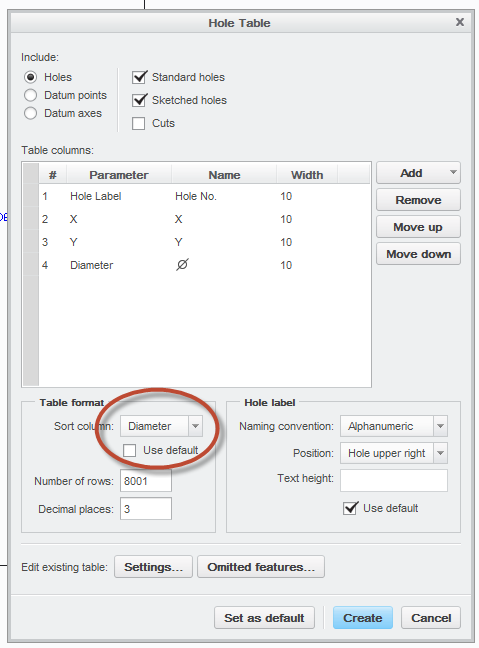
In hole table how can I get or hole table gives the holes in ascending order (in terms of diameter i.e, 3,3,4,5,5,6....etc.) (Creo 3.0)

    Best answer by adeshmukh


    Uncheck the “Use default” box and select Diameter as Sort Column.

    Hole Table.png

    2 replies

    18-Opal
    February 29, 2016

    Hi Akshay,

    Could you please clarify?  I'm not sure what your question is.

    Thanks,

    Amit

    adeshmukh1-VisitorAuthor
    1-Visitor
    March 1, 2016

    Hi Amit,

    hole table shows all the holes in your parts with diameter

    If your parts contain min. dia. of 3mm and then say 6mm, 8mm, 10mm etc

    so i want in hole table the diameter of holes should show in ascending order for ex. first it show 3mm then 6mm, 8mm etc.

    Hole table shows you as per you apply holes if you apply 10mm hole first then it shows you at first no. 10mm hole in hole table.

    18-Opal
    March 1, 2016

    Hi Akshay,

    Unfortunately, it is not possible to sort the order of the hole table.

    Amit

    adeshmukh1-VisitorAuthorAnswer
    1-Visitor
    March 2, 2016


    Uncheck the “Use default” box and select Diameter as Sort Column.

    Hole Table.png

    18-Opal
    March 2, 2016

    Hi Akshay,

    Thanks for the update.  I had found an article that stated it was not possible.  I will need to update it to show the correct behavior.

    CS158078 - Is it possible to sort order of Hole Table in Creo Parametric 2.0

    Amit

    17-Peridot
    March 2, 2016

    There is a reason we don't always believe PTC's support technicians

    Thanks for updating your records.