1-Visitor
October 29, 2014
Solved

How to create a footer in model tree

  • October 29, 2014
  • 2 replies
  • 4466 views

Hello,

I would need to know how to make a footer in a model tree to ensure that some features (for ex.mass properties) will remain always at the end of the model tree.

Thanks in advance

B.R.

T.

Best answer by GabrielZaha

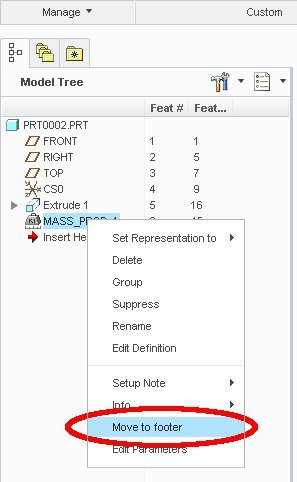
You need to create a analysis feature for the mass. After that select the analysis feature in model tree, right mouse click and select "Move to Footer"

move_to_footer.jpg

2 replies

14-Alexandrite
October 29, 2014

You need to create a analysis feature for the mass. After that select the analysis feature in model tree, right mouse click and select "Move to Footer"

move_to_footer.jpg

thlavinka1-VisitorAuthor
1-Visitor
October 29, 2014

How simple 🙂