
1-Visitor
February 6, 2014
Question

How to disable selection filters?

  • February 6, 2014
  • 3 replies
  • 11709 views

This is driving me crazy. Is there any way to disable the selection filters so I can freely pick what I want, like I used to be able to do before Creo?
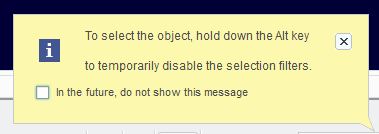
selection.JPG

(one of these days I will meet up with whoever thought creo was a good idea. Its not going to be pretty.)

    3 replies

    16-Pearl
    February 6, 2014

    Well it says hold alt.

    1-Visitor
    February 6, 2014

    Yeah and there is a period at the end of the sentence. Before you get to the period, its says "temporarily".

    16-Pearl
    February 6, 2014

    Put filter on geometry helps a bit?

    1-Visitor
    January 14, 2015

    I wish I knew. I only had to reply to say I'm with you, it's the one thing I just CANNOT get used to, and I just came googling again to see if there's a way to disable it. Yes I know about the alt key, but like you said you have to use every time, so that doesn't make it any less annoying.

    16-Pearl
    January 15, 2015

    You can always try to set up your own filter with everything in it. When in Drawing Mode go to File > Options > Selection and move everything to My Filter area. You can also set this custom filter as default selection filter.

    1-Visitor
    January 15, 2015

    Thanks Lakasz, yeah I did that, and added everything that was available. It helped "some", but it still doesn't have everything in there, plus the fact that the filter tends to automatically change to "general" and you have to keep put it back.

    So even with that in place, it still drives me mad!