1-Visitor
July 22, 2015
Solved

Script

  • July 22, 2015
  • 1 reply
  • 9071 views

Hello,

I want to make multiple analysis, from a robot in different positions. I want to be moving the robot and every 2 degrees I move it and make for every position a mode analysis, but since it is a long repetitive procedure i would like to run it has  it works with a servomotor. I would like to make a script that makes moves the position, then makes an analysis and then saves the results. i don´t have any idea if creo can makes scrips and how they work.

Someone has an idea?

Thank you very much,

Edna

    Best answer by Chris3

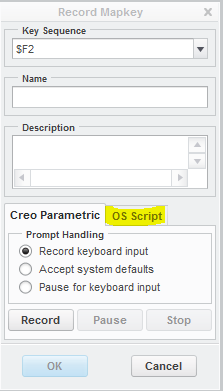
    I usually edit the mapkey directly, but you can also insert it from the Creo GUI.

    Capture.PNG

    Here is the syntax:

    mapkey(continued) @SYSTEMZ:\\folder\\subfolder\\script.VBS;\

    I usually write in VBS, but as Doug pointed out above you can include .bat files or other executibles. I have not reviewed Doug's code, but you could take that paste it into a text file, modify as needed, change to script.bat (or whatever you need) and then put it into the mapkey (like shown above) where needed (presumably the end).

    You could then create another mapkey that just calls the first mapkey over and over as many times as you needed.

    1 reply

    21-Topaz I
    July 22, 2015

    Creo has mapkeys which are a close equivalent of macros in Microsoft Office products. A mapkey key records your keyboard entries and function calls so you can repeat them over and over.

    This may not be enough for what you need though because there is no way to have a mapkey save results uniquely. The best it could do is to save the results as one file name or report but then the next time you ran it, it would same the same file name or report name which would try and over-write the previous save. This would likely same you some time though even if you had to manually change the file name each time it ran.

    Tricks with Mapkeys

    Mapkeys

    Tutorial: Creating Mapkeys  (requires login)

    You could get around that limitation with some external scripting or one of Creo's APIs but those are complicated programming solutions that are likely outside of the scope of your task.

    21-Topaz II
    July 22, 2015

    Perhaps the mapkey could call a batch file after the results are saved that looks at the directory contents and renames the file, appending a sequential number.

    We use this snippet of code to set sequential file names for exported files:

    :increment

    rem ** Set incremental value of 'VER'

    rem ** Since 'VER' is zero at start of file, first value will be 1.

    :loop

    set /a ver += 1

    if exist u:\%destination_folder%\%FILENAME%%suffix%_%ver%.%type% goto loop

    rem ** rename file with version

    rename %FILENAME%.%type% %FILENAME%%suffix%_%ver%.%type%

    rem ** Reset value of 'filename'

    set filename=%filename%%suffix%_%ver%

    :end

    21-Topaz I
    July 22, 2015

    Yeah, that's what I meant by external processing. I often do this sort of thing where I have a script written in some other language that is either called by a mapkey or that generates a mapkey so the mapkey can be pseudo dynamic.