

1-Visitor
January 3, 2015
Question

Sketch Constraint Conflicts

  • January 3, 2015
  • 2 replies
  • 3176 views

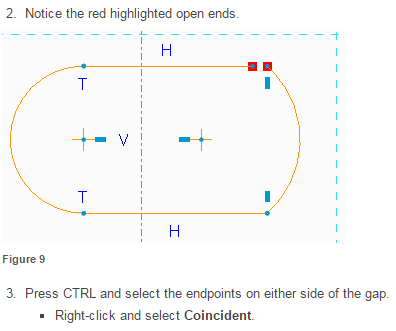
I have been a Solidworks user for many years, but I am new to Creo and studying it through the eLearning Library. There is a very simple exercise in eLearning that aims to teach how constraints work, but for some reason when I try it on my own I am having 'conflicts' when no conflicts exist. I have attached a small snip of the exercise (from eLibrary):
eLearning.PNG

The procedure (and the accompanying video) act as I would expect. However, when I try the procedure using an identical sketch (as shown):
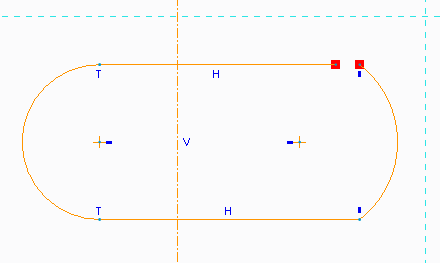
identical+sketch.PNG

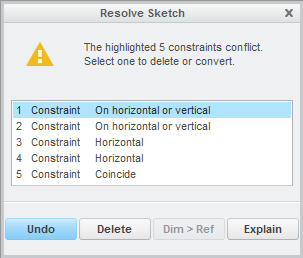
I receive a "resolve sketch" dialog box that prompts me to delete "conflicting" constraints.
resolve+sketch.PNG

None of these constraints conflict in the traditional sense of the word, nor are they any different from the constraints shown in eLearning. Does Creo treat redundant constraints as conflicting? If so, why does the identical eLearning procedure work without problems when mine does not? Thanks for the help.

    2 replies

    1-Visitor
    January 3, 2015

    Sketcher doesn't tolerate redundant constraints.

    It may be the order you are selecting the points that causes the problem. Rather than the constraint adding an equation to the Sketch, it attempts to move one end point to the other end point. If they are on an exact horizontal then one could move the line end point to the arc endpoint successfully, but moving the arc endpoint to the line endpoint would violate a number of existing constraints. If they aren't on a common horizontal then both selection orders should result in complaint. The constraints are such they should be on a common horizontal, so it may be just the order of selection.

    It is interesting and you should try picking items off the list to see what happens to the sketch to see what it is Sketcher Intent Manager is trying to accomplish.

    1-Visitor
    January 3, 2015

    Unfortunately, no combination of order selections solves the problem. Deleting any of the constraint conflicts in the list allows the points to coincide, yet the physical properties of each constraint remain (e.g. horizontal lines remain horizontal even if the horizontal constraint is removed). This leads me to believe that the only issue is redundancy, yet I still have no idea why it works in the eLearning lesson.

    17-Peridot
    January 3, 2015

    The solver drives me batty. I rarely see reason for what it chooses as redundancies other than a myopic view of previous actions to the redundancy and not the subsequent ones from the time "it" decides a specific constraint should exist, even if they are still weak.

    Don't give too much mind to this shortcoming. In general, the training is only trying to show you how to handle conflicts. In your case, it is overlooking the fact that it can extend the horizontal line and internally it is thinking moving only one end of the arc that is vertically constrained to the other. The solver is simply to quick to find fault with your technique when it isn't very good at actually solving or finding all the conflicts.

    What better way to learn than to learn that you might just be smarter than the software. Valuable life lesson

    24-Ruby III
    January 3, 2015

    Travis,

    I think that proper text related to the step 3 could be:

    Press CTRL, select endpoint of line and arc to fill the gap. Right click and select Coincident.

    Note: You have to delete Vertical constraint related to the right arc, if you want to apply the original step 3.

    Martin Hanak