1-Visitor
December 6, 2013
Solved

sketch symmetry

  • December 6, 2013
  • 4 replies
  • 4957 views

Hi folks,

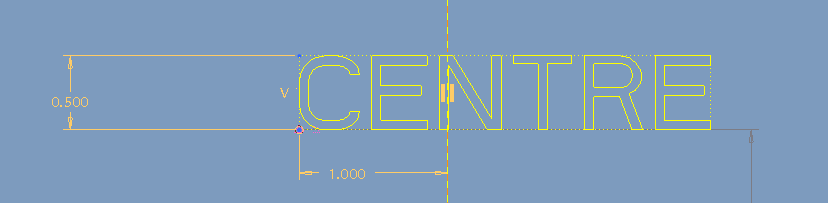
centre.PNG

Is it possible to place a sketch in symmetry with the reference of centre line?

Not by manual adjustment. I am looking for some automatic symetry option to place a sketch.

let me know if any option there or not?

Aravik
    Best answer by AraviK1

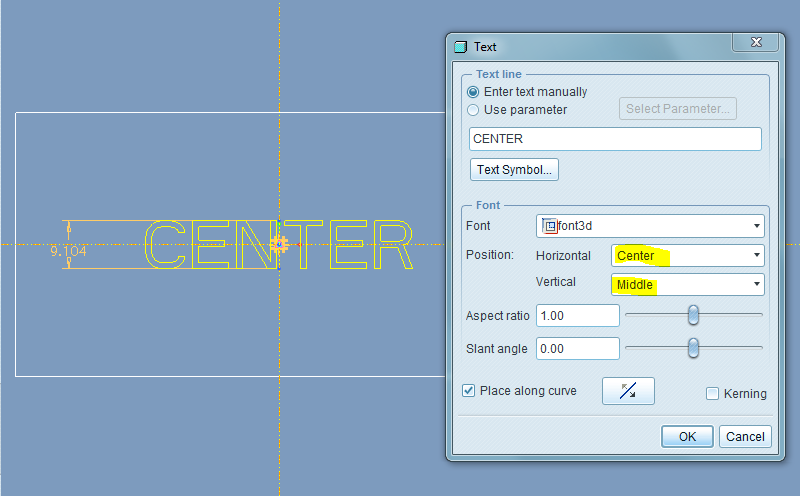
    1.PNG

    Thanks folks..

    Got the solution.

    AraviK

    4 replies

    AraviK11-VisitorAuthor
    1-Visitor
    December 6, 2013

    we can do one thing for this.

    Copy the sketch---->

    Paste the sketch---->

    Now we can fix the centre of that sketch with centre line or point.

    But this is not a direct solution. right?

    aravik

    21-Topaz II
    December 6, 2013

    You can change the text properties to be center jsutified. Tha places the anchor in the middle of the text string.

    AraviK11-VisitorAuthor
    1-Visitor
    December 9, 2013

    Thanks Doug.

    I tried this but its not norking.

    Can you suggest me that in clear steps if you can.

    Thanks

    AraviK

    21-Topaz II
    December 9, 2013

    It's an option in the dialog box when you initially place the text. I believe that you can access it when right clicking on the text and selecting properties. I don't have the time to dig into it at this point, dig around and you should be able to find it.

    1-Visitor
    December 7, 2013

    I'm guessing you are on WF5, so I've got no idea where I would look for these in menus there, but in Creo 2 it goes as:

    Select the sketch feature --> Model tab --> Paste Special --> Adv reference configuration --> Pick references you need to change

    or

    Select the sketch feature --> Model tab --> Operations dropdown --> Copy in menu manager --> and then it's go figure by reading the command line.

    Did I just call it a command line?

    AraviK11-VisitorAuthor
    1-Visitor
    December 9, 2013

    Thanks Jakub,

    Yes working On WF5.

    Thanks for your suggestions 🙂

    AraviK11-VisitorAuthorAnswer
    1-Visitor
    December 10, 2013

    1.PNG

    Thanks folks..

    Got the solution.

    AraviK

    17-Peridot
    December 10, 2013

    You can uncheck the "Place aling curve" option.

    Also note the Kerning option which works for some fonts.

    AraviK11-VisitorAuthor
    1-Visitor
    December 11, 2013

    Ok PlatinumAntonius .

    Thanks

    AraviK