1-Visitor
June 13, 2017
Solved

Style curves to a specific layer

  • June 13, 2017
  • 2 replies
  • 5299 views

Hi,

I would like my style curves automatically to be included in a specific layer so they will be easy to hide. Is that possible?

Thanks in advanced.

Hans

    Best answer by mkeskinen

    Hello Hans,

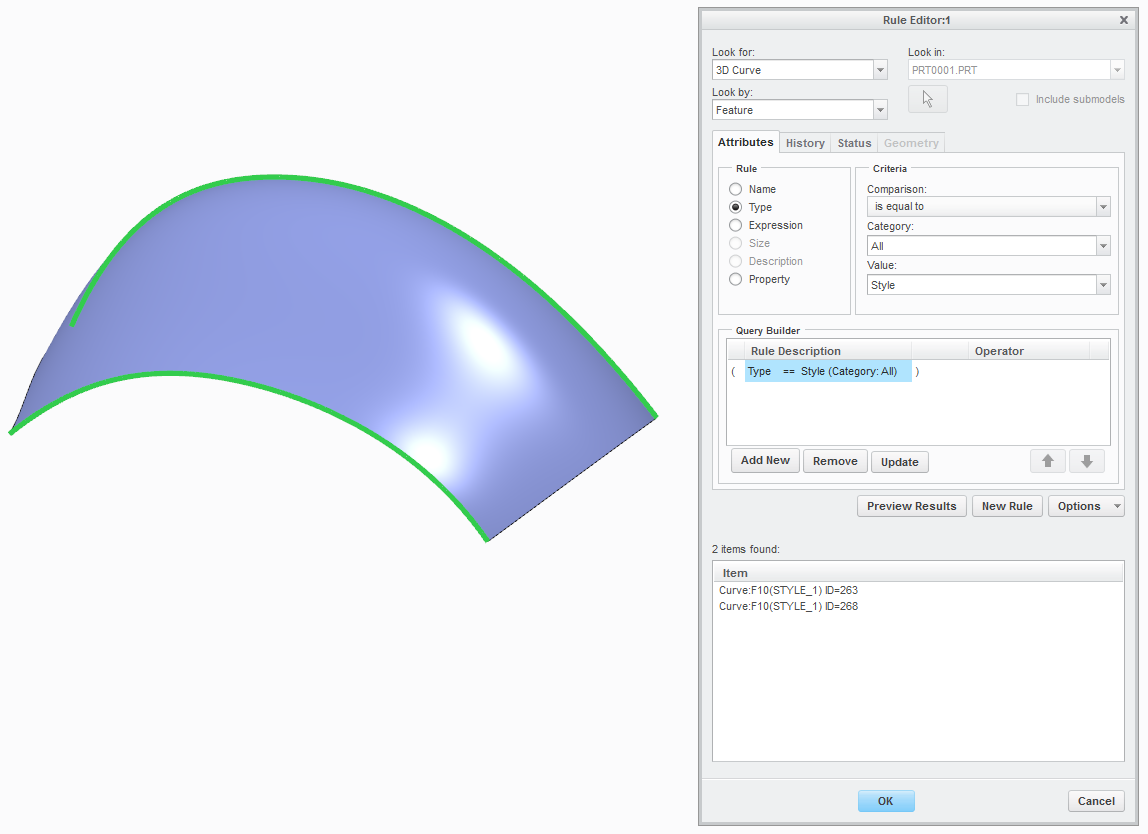
    create a layer with following rule to capture curves in style features.

    BR

    Miika

    Layer for style curves.png

    2 replies

    12-Amethyst
    June 13, 2017

    Hans,

    You can setup a rule in Layers that will capture the Style feature but it won't differentiate between Style curves and Style surfaces.  Make sure you setup the rule by selecting the following:

    Look for: Feature

    Look by: Feature

    Attributes: Type

    Category: All

    Value: Style

    Since Style features are normally "super features" with best practice being to combine curves and surfaces created using ISDX functionality being in a single feature (allows you to dynamically update things by pushing and pulling on the curves) I don't know of any way to separate the curves from the surfaces.

    If you are creating Style curves for use with Boundary Blend surfaces (each Style curve is an individual feature in the same manner as datum curves) then this layer rule will work for you

    Mike

    mkeskinen1-VisitorAnswer
    1-Visitor
    June 20, 2017

    Hello Hans,

    create a layer with following rule to capture curves in style features.

    BR

    Miika

    Layer for style curves.png