
1-Visitor
May 31, 2016
Question

The save box is grayed out so I can't choose the directory to save a file to. How do I fix this?

  • May 31, 2016
  • 3 replies
  • 5250 views

So this started recently happening when I try to save a file:
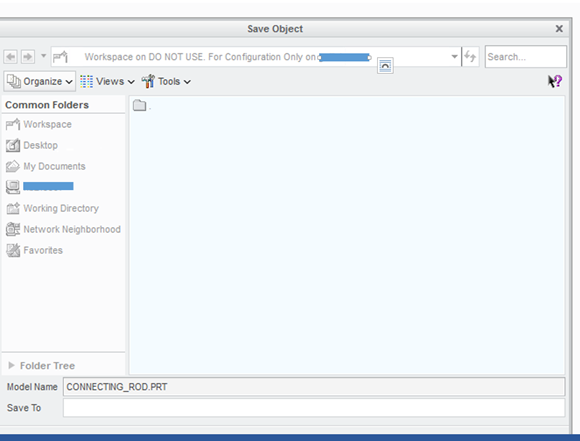
I am not able to choose the directory or folder I wish to save the file to. Can anyone tell me how to fix this? Thanks!

    3 replies

    Dale_Rosema
    23-Emerald III
    23-Emerald III
    May 31, 2016

    Not sure, but does this have anything to do with it?

    I noticed that is say, "Workspace on DO NOT USE. For Configuration Only...."  Does the admin have it blocked out?

    23-Emerald III
    May 31, 2016

    When it says "workspace", this means you are using Windchill PDMLINK to manage your files, is this correct?

    When using PDMLINK, you do NOT set directories for saving, it saves in to your workspace only.

    18-Opal
    May 31, 2016

    Actually, it does not matter if you are connected to Windchill or not.  Even in a standalone session of Creo Parametric, if the user does a File > Save, the only option is the model or drawing is saved to the Working Directory.

    If the user wants to save the model to a different folder, then it is necessary to do a File > Save As > Save a Copy, and select the new folder.  But a new name will need to be provided.

    If it is desired to save the model to a different folder and keep the same name, then it is necessary to do a File > Save As > Save a Backup.

    Thanks,

    Amit