
16-Pearl
June 6, 2016

Intelligent Mirror

  • June 6, 2016
  • 2 replies
  • 4142 views

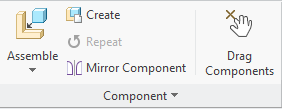
Check out the awesome new Mirror Component command in the Component group.
ribbon.png

Try mirroring a sub-assembly and make sure you check the “Perform symmetry analysis” option so potential symmetrical components will be reused and potentially adjust the mirror action by selecting from the following options:

  • Mirror Geometry
  • Reuse
  • Reuse Mirror Twin
  • Exclude

Watch the movie to see an example of mirroring a sub-assembly.

2 replies

17-Peridot
June 24, 2016

Not sure I would've realized you could mirror sub assemblies without this video. So far I'm pretty impressed by this tool as it seems to work better than the old mirror part that was hidden away.

Am I missing something or are there more options coming later? It seems like the same question is being asked twice in the Symmetry Analysis / Options portion. Also, does those settings only apply to sub assembly items?

mirror creo sneak peak.jpg

1-Visitor
June 20, 2019

The other question I have, is there a way to sort or select all the ones that say REUSE?


This way we can REUSE ALL and deselect ones we don't need on these big assemblies.

16-Pearl
June 27, 2016

Hi Lucas,

The "Elements to consider" can also be used when mirroring parts. Regarding the Advanced button, that is only available when (sub) assemblies are selected.

regards

Arnaud