12-Amethyst
Jan 11, 2022 12:15 PM UTC
Solved

Add Jlink to right click menu in model tree

In assembly mode I have added a Jlink app to select then you right click on a part.

Can I send the part name to this Jlink, so I can let Jlink work with this part?
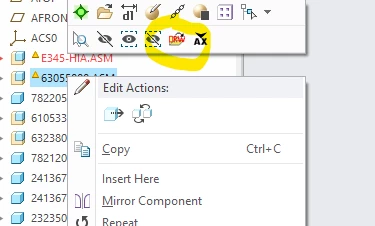
 

akok_0-1641903235786.png


sjurajAnswer
15-Moonstone
Jan 12, 2022 6:10 AM UTC

When you have something selected it is in SelectionBuffer so you can retrieve anything you like from it. If you have selected component you can directly access whole model not just file name.

5 replies

24-Ruby III
Jan 11, 2022 1:08 PM UTC

Hi,

please ask PTC Support.

Translate
24-Ruby IV
Jan 11, 2022 1:22 PM UTC
sjuraj15-MoonstoneAnswer
15-Moonstone
Jan 12, 2022 6:10 AM UTC

When you have something selected it is in SelectionBuffer so you can retrieve anything you like from it. If you have selected component you can directly access whole model not just file name.

Translate
akok12-AmethystAuthor
12-Amethyst
Jan 12, 2022 2:13 PM UTC

Thank you, it seems to by a step forward.

I can get the buffer, but a can't the part info, I have tried this:

Session session = pfcGlobal.GetProESession();
SelectionBuffer selection = session.GetCurrentSelectionBuffer();
Selections selections = selection.GetContents();


But I can't anything out of selections. The only thing I need is the file name.


Allan

Translate
15-Moonstone
Jan 13, 2022 8:56 AM UTC

You can have multiple items (seledted models) at same time .. to get first model in selection you do this

session.GetCurrentSelectionBuffer().GetContents().get(0).GetSelModel();

Or you can loop through all models in buffer  

Translate
