
7-Bedrock
September 13, 2022
Solved

Api to add filters to creo drawing repeat regions (Hide table column in Family table info)
  • September 13, 2022
  • 2 replies
  • 2732 views

parsi_0-1663080677816.png

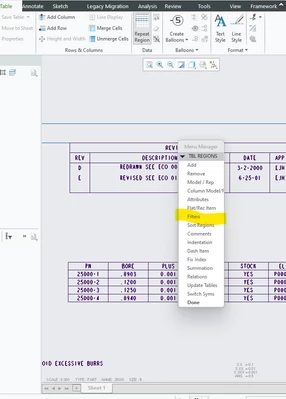
Actually, I'm planning to hide some of columns in "Repeat region table", which contains family table information.


Could you please help me , how to hide specific columns y name using VB API or tool kit.


Best answer by YaroslavSin

Creo allow save any drawing table to .tbl file. Create a table with filters then Table - Save table.

From toolkit call ProDwgtableRetrieve() to load this table from file and place it to a drawing.

2 replies

14-Alexandrite
September 14, 2022

There was a similar case here but it was about gathering the filters that were applied to a table:


https://community.ptc.com/t5/Customization/Checking-repeat-region-filter-with-toolkit/td-p/616609?art_lang=en&posno=3&q=filters%20for%20drawing%20tables&TechnicalArea=Toolkit&source=search


Result: No API that supports accessing drawing table filters 😞

17-Peridot
September 14, 2022

What is the goal for create the filter on the fly using api?

Is it possible to create a table template with the filter and load the table from file?

parsi7-BedrockAuthor
7-Bedrock
September 15, 2022

@YaroslavSin  In my case, user is creating the repeat region table with family table information.


But after few revisions, we are adding some new parameters to family table column and it's getting automatically added to table in drawing and table is going beyond the sheet.


We need to only few columns needs to visible and remaining needs to be hide in drawing table.  


As per our suggestions, we may do that based on CREO feasibility, but we need to add all required filters (More than 20) in table template and use that template while creating the new table.


My question here, what is the solution for already existing tables. How to control this issue ?


17-Peridot
September 15, 2022

I think, you can using API:

1. Find table in the drawing

2. Delete this table

3. Create new table with filters by loading the table from a file