
13-Aquamarine
August 5, 2022
Solved

BOM Balloon Parameter in a drawing template

  • August 5, 2022
  • 2 replies
  • 4373 views

Hi,


I want to set up a drawing template (or would also be happy with a format) where the BOM Balloons pick the numbering for assembly items not from a rpt.index, but a Find Number parameter. In an actual drawing I know how to set this (change rpt.index to asm.mbr.cparam.FINDNUMBER)...
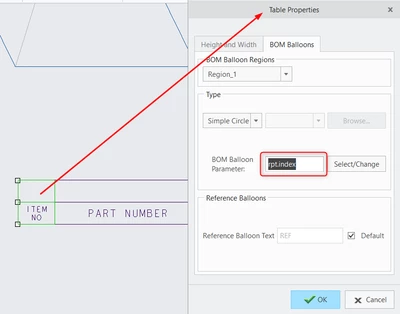
Zoltn_0-1659685090778.png

...but I'd like to have this set already from start when creating the drawings.

In a drawing template (.drw) the BOM Balloons tab of Table Properties is greyed out, as there's no model to "balloon".
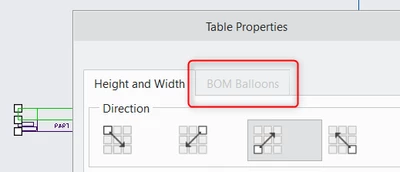
Zoltn_1-1659685376945.png


This is my catch 22. I'd like users not having to manually change this in the BOM table for every drawing they create.


Does anyone have an idea to achieve this for a template or format?
 

Best answer by MartinHanak

@Zoltán wrote:

Hi Martin,


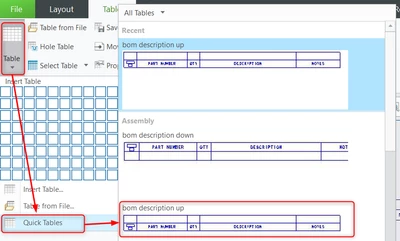
OK, so your template file does allow for me to change the BOM balloon parameter, but the built in quick tables don't. A bit annoying....

Zoltn_0-1659704983688.png

Can you confirm this on your setup?


Kind regards

Zoltán


Hi,

I am able to reproduce the problem with quick table named bom description up inside empty drawing (i.e. template drawing).

The problem can be also reproduced with manually created table containing 2 lines. I created the same table as bom description up.

The problem can be reproduced when the drawing does not have a model assigned.


Workaround:

  • create new drawing
  • assign a model to the drawing
  • place quick table named bom description up into the drawing
  • modify table properties as needed
  • save table into .tbl file
  • open drawing template
  • import .tbl file into drawing template
  • save drawing template
  • verify whether drawing template works well


2 replies

21-Topaz I
August 5, 2022

Dear @Zoltán 

You need to automate the change of a particular report parameter in the Table Properties. This Table Properties requires a model to balloon hence the change has to be dynamic and cannot be perform by a template that's static.


It is also confirmed by this article that no option exists to set that parameter by default : https://www.ptc.com/en/support/article/cs197755 


Why not create mapkey like suggested by the article resolution?

and let your users call that mapkey.

That mapkey will create the drawing, will call on the template that in turn will take the model in session, willcreate the table and once the table is in the drawing will apply the change? 

Zoltán13-AquamarineAuthor
13-Aquamarine
August 5, 2022

Why not? Well, that's a workaround of sorts, I already got the part of "need a model to do balloon settings".  😉

I was curious if there was a way to do this without a mapkey, but of course that is a solution and the way one has to take given the way Creo works at this point.

Thank you for the reply/solution!

24-Ruby III
August 5, 2022

@Zoltán wrote:

Hi,


I want to set up a drawing template (or would also be happy with a format) where the BOM Balloons pick the numbering for assembly items not from a rpt.index, but a Find Number parameter. In an actual drawing I know how to set this (change rpt.index to asm.mbr.cparam.FINDNUMBER)...

Zoltn_0-1659685090778.png

...but I'd like to have this set already from start when creating the drawings.

In a drawing template (.drw) the BOM Balloons tab of Table Properties is greyed out, as there's no model to "balloon".

Zoltn_1-1659685376945.png


This is my catch 22. I'd like users not having to manually change this in the BOM table for every drawing they create.


Does anyone have an idea to achieve this for a template or format?


Hi,

what Creo release do you use ? I tested Creo 9.0.0.0 >>> I can access BOM Balloons tab in Table Properties.dialog box.

Zoltán13-AquamarineAuthor
13-Aquamarine
August 5, 2022

Hi,


7.0.4.0, but do you do this in a drawing with no model? To be able to save it as a template?

24-Ruby III
August 5, 2022

@Zoltán wrote:

Hi,


7.0.4.0, but do you do this in a drawing with no model? To be able to save it as a template?


Hi,

in Creo 7.0.5.0 everything works well. See video FINDNUMBER.mp4 and investigate attached files.