

Can I create a coordinate system in the toolkit using points and planes?
I tried to create a coordinate system by looking at UgGeneralCsysCreate.c.
Origin Reference uses PRO_VALUE_TYPE_SELECTION as its data.
PRO_VALUE_TYPE_SELECTION selects a coordinate system and refers to the direction and offset of that coordinate system.
PRO_CSYS_ORIENTMOVE_MOVE_OPT_ROT_X and PRO_CSYS_ORIENTMOVE_MOVE_OPT_TRAN_X can be used to set the orientation or offset of the referenced coordinate system.
My question starts here.
Can I create a coordinate system by selecting two datum points and planes without selecting a coordinate system?
For example, The direction from the first datum point to the second datum point is the Z axis.
The opposite of the direction from the point to the plane is the Y axis.
The tasks that are done at Creo are as follows and I need to implement them in a toolkit.
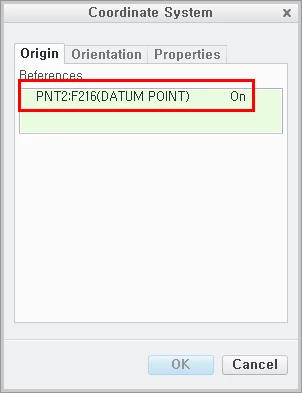
1. The first selected datum point becomes the circular reference of the coordinate system.
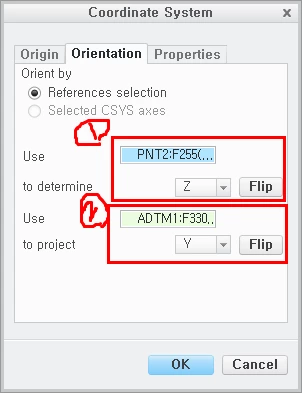
2. The Z axis direction is set with reference to the second selected datum point.
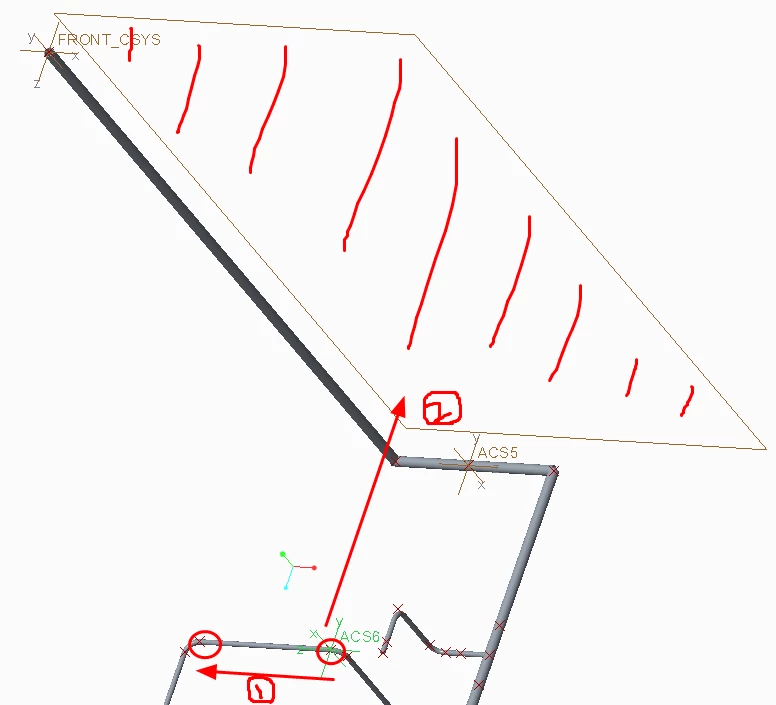
3. The Y axis is the direction you flipped over to for the last selected plane.
Is it possible?
If is possible, how do I modify the options in the code in the user guide?
If not, are there any other good ways?