
18-Opal
September 24, 2021
Solved

Color processing for FORM and HOLE shapes in drawings

  • September 24, 2021
  • 2 replies
  • 1662 views

I'm trying to easily change the line color for FOMR and HOLE(EXTRUDE) using a combination of toolkit and mapkey.
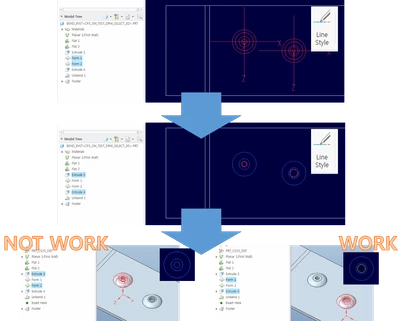
As shown in the video, after collecting the form shape, the intended operation was attempted by changing the line color.
pic_.png

However, an unexpected result appeared.
If HOLE(EXTRUDE) occurs before the FORM shape, the HOLE(EXTRUDE) color is not changed.


How to make the function work smoothly...
When modeling in Creo, is it best to design the FORM first and then use HOLE(EXTRUDE)?

Thanks.


P.S. attach test mdl and source

Best answer by CHASEONHO

step 1. collect hole/extrude feature and get geomitem pnt.(arc-curve origin 3d pnt.) 

step 2. translate to 2d 3d pnt.

step 3. collect form feature and geomitem pnt.

step 4. translate to 2d 3d pnt.


After comparing the collected form and hole/extrude, if they match, the color change is successful even for the exture by setting the color.

Thanks.

2 replies

17-Peridot
September 24, 2021

it is a good idea to use  ProGeomitemIsInactive() when visiting feature geometry. HIH. 

CHASEONHO18-OpalAuthorAnswer
18-Opal
September 28, 2021

step 1. collect hole/extrude feature and get geomitem pnt.(arc-curve origin 3d pnt.) 

step 2. translate to 2d 3d pnt.

step 3. collect form feature and geomitem pnt.

step 4. translate to 2d 3d pnt.


After comparing the collected form and hole/extrude, if they match, the color change is successful even for the exture by setting the color.

Thanks.