4-Participant
September 29, 2025
Solved

Create a progress circle using Creo UI editor

  • September 29, 2025
  • 1 reply
  • 1202 views

I see there is a Progress bar component in Creo UI editor.

1. Is it possible to have something like a progress circle in Creo UI editor?

2. Or a custom gif that we could display to accomplish showing an in-progress operation?

cc @GS_14113977 

Best answer by MikePhillips

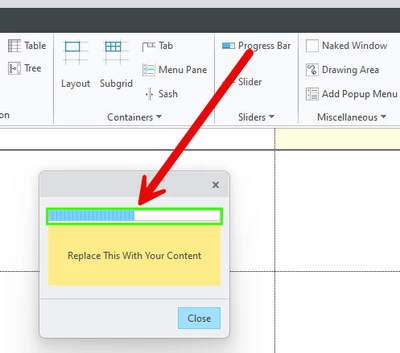
Looks like there is a progress bar component. I have never used it before. (The screen shot is from version 7)


MikePhillips_0-1759165939017.png


1 reply

12-Amethyst
September 29, 2025

Looks like there is a progress bar component. I have never used it before. (The screen shot is from version 7)


MikePhillips_0-1759165939017.png


4-Participant
September 29, 2025

Thanks @MikePhillips .

 Apologies if I was not clear, what I meant was, I see the Progress bar component but is it possible to use a circle to show the progress instead of a 'bar' or anything custom for that matter.

12-Amethyst
September 29, 2025

Sorry. I did not read your post very well at all! That is my mistake. ðŸ¤£


I would think you could utilize a Drawing Area. You could then loop thru a serious of images that create the illusion of an animated circle progress. Or draw a progress image.