5-Regular Member
August 3, 2022
Solved

Creating relation for Note parameter to note

  • August 3, 2022
  • 1 reply
  • 7112 views

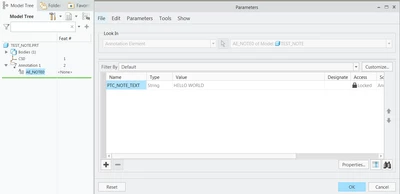
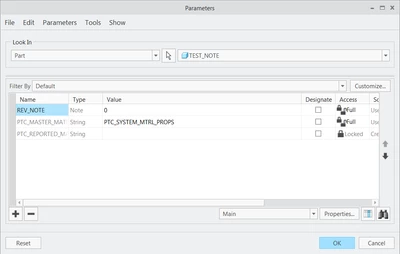
Hi i want to create a relation that creates a note parameter. like note A

KB_9100625_1-1659544985840.png


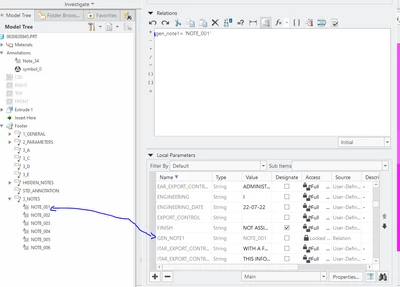
 i can make number parameters, strings parameters,  etc. but not a note parameter (the current parameter is a string i want it to be a note parameter
KB_9100625_0-1659542570027.png

KB_9100625_0-1659544967818.png


Best answer by tbraxton

Yes, here is a sample drawing and model (Creo 7) that implements the scheme you describe above.


There is a parameter generated within a model note as seen here. That can be used in a relation.

tbraxton_0-1659553656813.png


Here are the model parameters used to generate the note seen in the drawing


tbraxton_1-1659553811146.png


1 reply

tbraxton
22-Sapphire II
22-Sapphire II
August 3, 2022

You can use a parameter value within a note which is what I gather you are attempting. Once the value of Gen_Note1 is defined you can then use that value in a note by using the following syntax "&Gen_Note1" .


Keep in mind that if the string value of a parameter is lengthy then using it to generate a note is not the best way to handle this in Creo IMO.


One option is to define your standard notes in a text editor (i.e. MS Word) and include the parameter names for values that will vary when the note is placed into a model or drawing. This will make it easier to maintain the standard notes and enable re-use.

5-Regular Member
August 3, 2022

no I'm trying to create the parameter gen_note1 as a note parameter through a relation like parameter A here

KB_9100625_0-1659544936782.png


tbraxton
22-Sapphire II
22-Sapphire II
August 3, 2022

I am still not clear one what you are attempting to do.


Your goal is to create a parameter "A" of type note by evaluating a relation in a part model?