
1-Visitor
August 11, 2025
Question

creo 10.0.0.2.0 - Remove "expand all" from navigation

  • August 11, 2025
  • 3 replies
  • 446 views

Hello everyone,

How can I remove the "Expand All" command from the navigation trees?
It’s an extremely annoying icon.
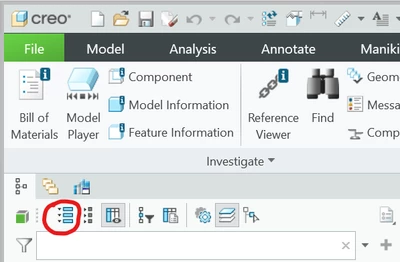
PS_10957553_0-1754936199385.png

Thank you in advance for your help.

Pavel

3 replies

21-Topaz II
August 11, 2025

Model tree info from the support pages:

https://support.ptc.com/help/creo/creo_pma/r11.0/usascii/index.html#page/fundamentals/fundamentals/About_the_Model_Tree_1.html 


Seems to indicate that you can't remove such things from the interface. 

Unless someone else knows a method, which is unlikely.

18-Opal
August 12, 2025

I guess the display image is saved on disc, you can try to replace the image by a 1x1 transparent image, if gif or png. This will make it difficult to hit πŸ˜΅β€πŸ’«or a red point only.


If Creo is blaming about the size, I don’t believe that, but you can try to completely remove the image (here you may get a default one), or just a blank image with the same size. 

Community Manager
September 30, 2025

Hi @PS_10957553,


I wanted to see if you got the help you needed.

If so, please mark the appropriate reply as the Accepted Solution. It will help other members who may have the same question.
Please note that industry experts also review the replies and may eventually accept one of them as solution on your behalf.
Of course, if you have more to share on your issue, please pursue the conversation. 


Thanks,
Anurag