
3-Newcomer
July 23, 2026
Question

Creo 11.0.5 graphical corruption (edge rendering) on Windows 11 ARM / Parallels / Apple M4 Pro

  • July 23, 2026
  • 3 replies
  • 60 views

Hello everyone,

I am running Creo Parametric 11.0.5.0 Education on Windows 11 ARM inside Parallels Desktop 20.4 on an Apple Mac mini M4 Pro with 12 Cores and 24 GB of RAM for the Virtual Machine.

After adding the following lines at the beginning of parametric.psf

ENV=PROCESSOR_ARCHITECTURE=AMD64

ENV=PRO_MACHINE_TYPE=x86e_win64

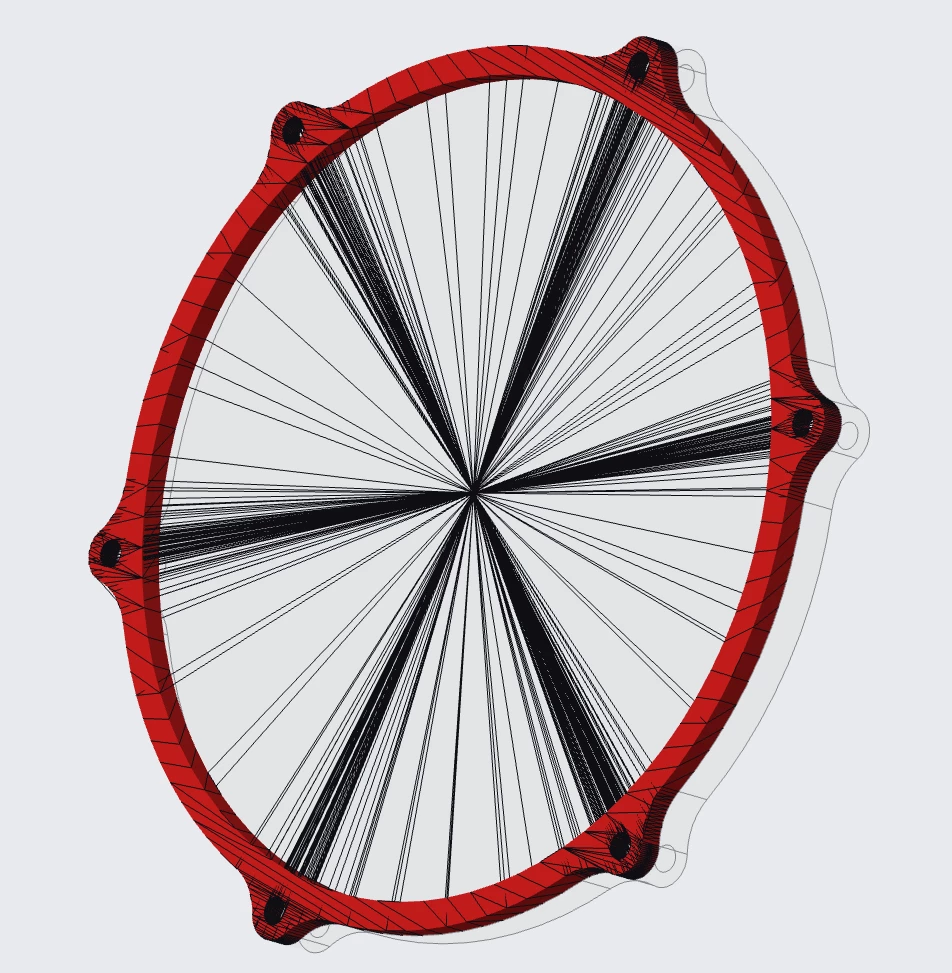
Creo starts and works correctly in Shaded mode. However, as soon as Shaded with Edges is enabled, severe graphical corruption appears. Hundreds of incorrect black lines are drawn between unrelated vertices. The surfaces themselves are rendered correctly.

Interestingly, during the first second while the model is still loading, the edges are displayed correctly. The corruption only appears after the loading process has finished.

Changing edge_display_quality from very_high to low only changes the edge quality but does not solve the issue.

Larger assemblies also eventually crash with EXCEPTION_ACCESS_VIOLATION.

Trying the same on an older MacBook Air M1, Creo runs significantly slower and becomes practically speaking

unusable with bigger assemblies but doesn’t show the same artefacts at displaying objects. 

According to support.inf, the renderer is:

  • OpenGL Vendor: Parallels and Apple
  • OpenGL Renderer: Parallels using Apple M4 Pro (Compat)
  • OpenGL Version: 4.1 Metal
  • OpenGL GPU Line Rendering: Disabled

Has anyone experienced similar rendering issues with Creo on Apple Silicon / Windows ARM / Parallels, or is there a known workaround?

Thank you!
 

3 replies

KenFarley
21-Topaz II
July 24, 2026

Creo is software native to Windows, has been for a while. Unfortunately for you it is also highly reliant on interfacing with graphics hardware and the like. Most of the people who run the software and post on these forums are doing so for work, and on employer-supplied computers, which by and large are Windows based.

As such, not a lot of help is forthcoming for running Creo on MacOS based systems. I tried to do so with Parallels a while back and it was a clunky mess, dealing with the licensing, graphics, etc. I never found a viable setup.

Check out the other inquiries from the past suggested to you in the “Related Topics” sidebar on this page. There’s usually a lengthy question, but rarely are there any answers. As far as I know, running the software via a virtual machine is an unsupported (by PTC) activity - your troubles are your own, they are not going to be able to assist. It’s unfortunate, really, because the latest Apple systems are so fast and would easily handle running Creo. It’s just the graphics handling seems to be “incomplete”?

3-Newcomer
July 24, 2026

Thanks for the quick reply! 
Let’s hope an update maybe on the Parallels side can fix things at least partially in the future. 
The new Macs are running Windows incredibly fast even on an external SSD and once you get Creo working, designing Creo parts and using Windchill is actually enjoyable. 

KenFarley
21-Topaz II
July 24, 2026

It’s almost like they need to have a graphics card “emulator” within Parallels, something like a code package or add-on that communicates with Creo as if it was a “proven” graphics card. The Parallels software already does this, but it seems like if Creo is the target application, you need specific graphics handling so it goes smoothly. That’s probably a difficult thing to do, but not impossible. Maybe the graphics card maker would be able to help.

18-Opal
July 26, 2026

Yep - Parallels. Not sure why this is still broken - it is an emulation issue on Parallels (they changed the product recently and it caused a lot of pain).