12-Amethyst
January 27, 2024
Solved

CREO Parametric - Number of factets on an STL file

  • January 27, 2024
  • 3 replies
  • 3179 views

Hi,

I use CREO Parametric 9.0 Student Eddition as a Hobbyist. When creating an STL file (Save as STL) for a 3D printer, I observe that the number of facets on circular srfaces is relatively low.


My question is : How to increase the number of factets, in order to get more precise circular surfaces ?


I foud this article in the CREO support, but it seems to be valid for another software : https://support.ptc.com/help/creo/ced_modeling/r20.5.0.0/fr/index.html#page/ced_modeling/OSDM_Main/Parts_23.html


Is there a limitation of the Student Edition ?


Thanks for your help

 

Best answer by tbraxton

Chord height needs to be minimized to yield the best approximation of model geometry during tessellation. This will result in max number of facets when generating an STL.


Explanation of chord height:

Controlling the Quality of Export (ptc.com)


When exporting do the following:


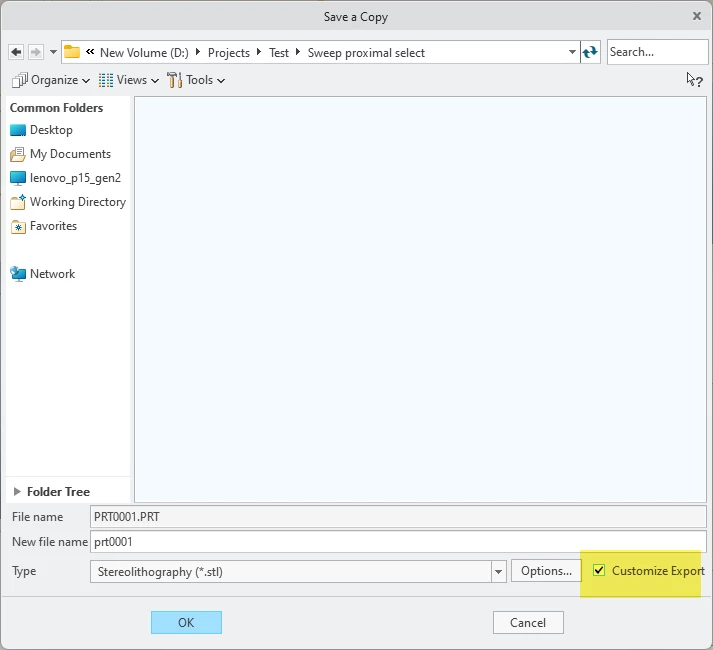
Select the customize export option

tbraxton_0-1706362890792.png

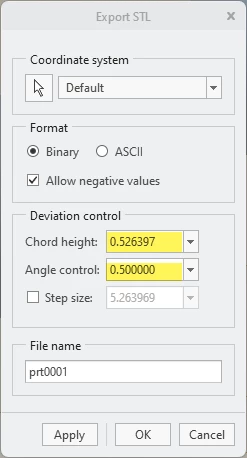
Set the chord height to zero and Creo will minimize it with the lowest possible value for the model.

Set angle control to 1


tbraxton_1-1706362951962.png


3 replies

24-Ruby III
January 27, 2024

Hi,

  • set absolute accuracy in model
  • set lower absolute accuracy value in model
15-Moonstone
January 27, 2024

Changing the absolute accuracy of the model won't change the number of facets.

I have created a video to show you how you can change the way the facets are generated.
The video is made in Creo 10. However, it is the same in other versions of Creo.


You can watch the video through the following link


https://technologiecampusdiepenbeek.be/PTC_Community/STL_facets-Creo_10.mp4 


I hope this will help you solve your problem.


Best regards,


     John Bijnens

YHAdesign12-AmethystAuthor
12-Amethyst
January 27, 2024

Hi John,


Thank you very much for your help ! It works perfectly and I can now specify the accuracy of my STM models.


Thank you for your reactivity 👍


Best regards,


Yves

tbraxton
22-Sapphire II
tbraxton22-Sapphire IIAnswer
22-Sapphire II
January 27, 2024

Chord height needs to be minimized to yield the best approximation of model geometry during tessellation. This will result in max number of facets when generating an STL.


Explanation of chord height:

Controlling the Quality of Export (ptc.com)


When exporting do the following:


Select the customize export option

tbraxton_0-1706362890792.png

Set the chord height to zero and Creo will minimize it with the lowest possible value for the model.

Set angle control to 1


tbraxton_1-1706362951962.png


YHAdesign12-AmethystAuthor
12-Amethyst
January 27, 2024

Thank you so much for your tip abd your reactivity., It works perfectly and now, my STL model are very accurate 🙏


Best regards,


Yves