
9-Granite
February 20, 2026
Question

Creo toolkit full asynchronous mode build error
  • February 20, 2026
  • 3 replies
  • 61 views

2026-02-20_06h53_55.png

Hello there,

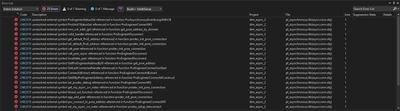
As you can see , i am trying build a simple full asynchronous mode of toolkit application to connect to a running creo session, later i will try to fetch the component details. But as off now i am stuck with this errors  , can anyone help me. 

1) I am not sure if i have included correct libraries in project settings.

2) stuck in these errors 

is there any manual to dive deep to study on full asynchronous mode


3 replies

Community Manager
March 2, 2026

Hi @TP_9862373

Thank you for your question. 

Your post has not yet received any response. I am replying to raise awareness. Hopefully, another community member will be able to help.
Also, feel free to add any additional information you think might be relevant. It sometimes helps to have screenshots to better understand what you are trying to do.


Best Regards,

Vivek N
Community Moderation Team

17-Peridot
March 5, 2026

most likely there was a missing library, an incorrect runtime library, an incorrect _DEBUG macro, or a combination of these.

It would be a good idea to post the Visual Studio Project Properties → C/C++ → Command Line text, as well as the Linker → Command Line text, instead of a blurry picture.

9-Granite
March 5, 2026
 

in c++:

/JMC /ifcOutput "dim_async_2\x64\Debug\" /GS /W0 /Zc:wchar_t /I"C:\Program Files\PTC\Creo 11.0-M050\Common Files\protoolkit\includes," /ZI /Gm- /Od /Fd"dim_async_2\x64\Debug\vc143.pdb" /Zc:inline /fp:precise /D "_ITERATOR_DEBUG_LEVEL=0" /D "PRO_USE_VAR_ARGS" /D "_MBCS" /errorReport:prompt /WX- /Zc:forScope /RTC1 /Gd /FU"C:\WINDOWS\assembly\GAC_64\System.Data\2.0.0.0__b77a5c561934e089\System.Data.dll" /FU"C:\WINDOWS\assembly\GAC_MSIL\System\2.0.0.0__b77a5c561934e089\System.dll" /FU"C:\WINDOWS\assembly\GAC_MSIL\System.Xml\2.0.0.0__b77a5c561934e089\System.Xml.dll" /MT /FC /Fa"dim_async_2\x64\Debug\" /EHsc /nologo /Fo"dim_async_2\x64\Debug\" /Fp"dim_async_2\x64\Debug\dim_async_2.pch" /diagnostics:column

in linker :

/OUT:"C:\Users\prithivi\Desktop\creo\vs_professional\dim_async_2\x64\Debug\dim_async_2.exe" /MANIFEST /NXCOMPAT /PDB:"C:\Users\prithivi\Desktop\creo\vs_professional\dim_async_2\x64\Debug\dim_async_2.pdb" /DYNAMICBASE "protk_dll_NU.lib" "ucore.lib" "ws2_32.lib" "netapi32.lib" "mpr.lib" "pt_asynchronous.lib" "psapi.lib" "kernel32.lib" "user32.lib" "gdi32.lib" "winspool.lib" "comdlg32.lib" "advapi32.lib" "shell32.lib" "ole32.lib" "oleaut32.lib" "uuid.lib" "odbc32.lib" "odbccp32.lib" /DEBUG:FULL /MACHINE:X64 /INCREMENTAL /PGD:"C:\Users\prithivi\Desktop\creo\vs_professional\dim_async_2\x64\Debug\dim_async_2.pgd" /SUBSYSTEM:CONSOLE /MANIFESTUAC:"level='asInvoker' uiAccess='false'" /ManifestFile:"dim_async_2\x64\Debug\dim_async_2.exe.intermediate.manifest" /LTCGOUT:"dim_async_2\x64\Debug\dim_async_2.iobj" /ERRORREPORT:PROMPT /ILK:"dim_async_2\x64\Debug\dim_async_2.ilk" /NOLOGO /LIBPATH:"C:\Program Files\PTC\Creo 11.0-M050\Common Files\protoolkit\x86e_win64\obj" /TLBID:1


18-Opal
March 5, 2026

Just check the make examples in the installed toolkit folder for asynchronous apps. Here is all what you need to compile, next enhance by your needs.

14-Alexandrite
March 13, 2026

Many correct hints have been given already.

  • Start with PTC provided ootb examples - they do work with supported software versions (compiler etc.). Enhance the examples step by step - incl. changing your build setup/IDE/dependencies to be able to track down errors.
  • No protk.dat needed for asynchronous TK applications (but for synchronous/spawn applications!).

Not mentioned yet, but helps to rule out environment problems: start the asynchronous TOOLKIT application from within Creo (inherits environment variables and other process contexts from Creo that help the IPC pro_comm_msg.exe to find/connect to Creo).
Therefore in Creo use the button/command "Open System Window". A cmd.exe terminal appears, blocking Creo (since synchronous to Creo).
In this terminal, type and execute

start "Creo context" cmd

 a 2nd terminal window opens (inheriting Creo context, too) with title "Creo context", but this is non-blocking to Creo.
Now close the 1st terminal to unblock Creo.
The 2nd terminal "Creo context" should be still open and can be used to start asynchronous applications as usual, but more likely to connect.

If this still does not work, something seriously blocks IPC (TCP/IP) or simple errors where made using TOOLKIT API/setting up Creo.