12-Amethyst
September 27, 2024
Solved

CREO VB API export step files

  • September 27, 2024
  • 1 reply
  • 2743 views

hi All 


i want to write a simple code which exports an active model into a step file. 


nevertheless, i do not fully understand how the ExportIntf3D works. 

is there somewhere an example where i can check?


i think its no big deal for someone who knows what he is doing 😄

Best answer by chshasa1

hi


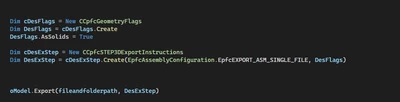
this is how i solved it


chshasa1_0-1728055358563.png


1 reply

21-Topaz I
September 27, 2024

Hi 

keep in mind that the VB API and Creo Toolkit at large is an automation of existing commands.
in that instead ExportIntf3d is the automation of exporting to step with a profile.
So you need to create a profile file and then give its path to the function.

what exactly do you not understand?
Did you look into the documentation and shipped examples and search for sample code? 

chshasa112-AmethystAuthor
12-Amethyst
September 27, 2024

hi Remy


my problem is that i do not understand how to exactly code it. the profile i already have and i am retrieving it but then i do not know how to exactly paste it in the function.

red box shows the profile path

or is it correct there with the green ones, which does not work

chshasa1_1-1727428350879.png


chshasa112-AmethystAuthorAnswer
12-Amethyst
October 4, 2024

hi


this is how i solved it


chshasa1_0-1728055358563.png