
18-Opal
August 6, 2026
Question

CREOSON AI MCP Interface (tested - what is next?)

  • August 6, 2026
  • 25 replies
  • 773 views

A preview of something that is being tested within CREOSON, looking for feedback and ideas.

Keep these questions in mind as you read:

  • Do I (or my company) care about my data going to someone else’s AI / Cloud?
  • What use cases, processes, interfaces cause pain today?
  • How could this change my day?
  • Why do I care?

The intent is to provide a FREE AI MCP (Model Context Protocol) interface within CREOSON that enables your AI Agents to connect to and drive Creo Parametric either as a specific set of contextual tasks - or within the context of other systems/environment workflows (e.g. YOUR models, standards, documents, EPR, PLM, etc.).  Seems like this would be super powerful, and provide a lot of utility.


This screen capture is an example of an AI Agent validating a connection to a new CREOSON MCP Endpoint (prototype currently). 
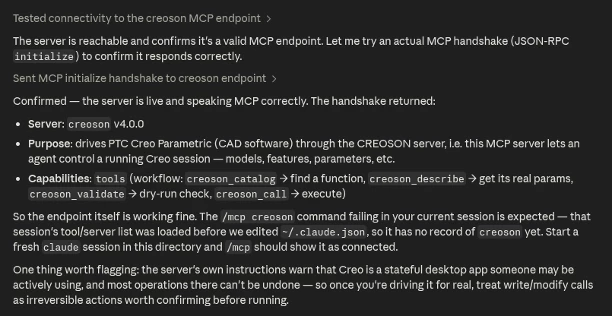
CREOSON - AI MCP Endpoint First Connection Test Result

The CREOSON MCP Server enables you to choose/bring your own AI (Commercial Platform or Local AI).  The screenshot above was tested using an Anthropic’s Claude Code (linux desktop) talking to a CREOSON / Creo Parametric Session across the network on a Windows 11 Machine. 😎


Talking to Big-Iron AI (Claude-Code, Codex, Gemini, Grok, etc) is for sure useful, but every interaction is training those models with your data.


I think that Local AI will be a top priority very soon for companies - especially regarding designs, specifications, internal documentation that represents genuine Intellectual Property that should not go to Cloud AI Models.


Local AI is coming (technically - it is already available/here)… and enables 

  • No AI platform dependency (multiple/capable open source models available)
  • No extra licensing fees required (you pay for power, not tokens),
  • Sovereign - YOUR data, processes, and interactions remain YOURS and in YOUR control (perfect for air-gapped or highly-regulated environments),
  • Flexible/Trainable/Extendable - easily connect to your documents, systems, and build your own skills (secret sauce) for what and how you do what you do...

Bonus regarding Local AI - most CAD systems already have very capable graphics card for running CAD and AI locally (low barrier to implementation/access).


Properly done, this would enable your Creo Models / Drawings to be folded into the context of other processes and workflows (documents, standards, specs, other MCP services in/out of your organization).


Any feedback on this potential CREOSON MCP capability?  Suggestions? Thoughts?


Dave


25 replies

18-Opal
August 23, 2026

Here is a new experiment running on a mid-2017 MacBook Pro with a 100% Local AI (Gemma4) talking to a remote Windows 11 Machine that has a CREOSON MCP Endpoint (in beta).

This was just a simple connection test - asked it if it can see the CREOSON MCP endpoint?  And this was the response.

The cool thing about this…. the Local AI knows “nothing” about Creo Parametric before this interaction.  The MCP provided enough context to give the Local AI a bit of courage. 🤣


NOTE: I do not recommend running a Local AI on a mid-2017 MacBook Pro. 🙄  But it definitely works.


Dave

18-Opal
August 23, 2026

If that last post interaction between a Local AI and the CREOSON MCP interface did not make sense…

This should make more sense.


18-Opal
August 25, 2026

I have fielded quite a few questions regarding Local AI and how to do that effectively.

My “Go To” Answer on this comes down to three (3) factors:

  1. The Model - you need a language model capable of contextualizing and reasoning your content
  2. The Harness - the glue that orchestrates your intent, your skills, language model, MCP endpoints 
  3. Inference Speed - the hardware required to run your language model (capacity and speed)

Those are (IMHO) the most important - inference runtime/engine for the model is another factor (geeky stuff 🤓).


I wanted to show more than “Claude Code” as an interface to Creo Parametric (everyone does that, figured some would appreciate a radically different approach).   So I picked this stack as a test.

  1. Model - Gemma 4 31B (31B indicates the size of the model 31-BILLION Parameters)
  2. Harness - OpenCode (an Open Source harness, like Claude Code or others)
  3. Inference Speed - Cerebras (running the exact same Gemma 4 31B you can run locally)

Cerebras hosts the Gemma 4 31B Model, the OpenCode Harness knows how to talk to it via an Cerebras API Key, and OpenCode also knows where the CREOSON MCP is located (a Win11 Machine on my local network) - oh.. OpenCode is running on my MacBook Pro - orchestrating ALL this traffic.


The reason I chose Cerebras is simple:

  • Cerebras has the fastest commercially available AI Inference on the planet,
  • The Local AI Model I wanted to test (Gemma 4 31B) was running on the Cerebras platform, 
  • Everything else was local to my computer/network

So this setup enabled me to show how important inference is in a relevant engineering example. Open a model, change all the names to have a prefix, generate drawings for every model, ultimately generate all the PDFs. Here was the result:


So - this is literally one of those pinch my-self days because it did not seem real.  We provided a few things (very quickly).

My instructions to Gemma 4 31B via OpenCode, were properly contextualized with the CREOSON Agent Skills and orchestrated to CREOSON MCP running on another laptop connected to Creo Parametric from my MacBook Pro. (a cigarette worthy experience).


The point of this post is simple.  AI is getting REALLY GOOD, REALLY CHEAP, and REALLY CAPABLE.  Local AI specifically will be one of the most important factors in Engineering - this will require good models, good harnesses, and good hardware. 

The next year will be explosive for AI in engineering - the Hardware is getting bigger, the models are getting smaller, and the orchestration of all this is getting easier. You are going to have many choices.

Hang on.. this is going to be fun!


Dave


18-Opal
August 27, 2026


18-Opal
August 28, 2026

Pro-Tip…  make sure your infrastructure is ready to support your crazy AI ideas (at scale).


This is a screenshot of a very long set of functional unit tests across a range of CREOSON function groups/use cases.  Basically, this was running on a remote Windows 11 computer, orchestrated from my Mac.  No Crashes, No Errors, No Resets, Creo Parametric (v8) just grinding away for ~1.5 days executing 1M+ transactions. 🙌


18-Opal
September 1, 2026


Here is a nice example of how imperfect intent requests (bad spelling) can still be contextualized into Creo Parametric commands via CREOSON MCP AI Agent and Skills. 


BTW - This example was a CREOSON MCP (beta) Endpoint talking to Creo 3… remotely from another machine using OpenCode while talking to a Gemma 4 31B Model hosted on Cerebras (the fastest commercial inference in the world).  The same AI Model and harness can run on your local machine/network… providing 100% Local AI where your data, transactions, processes remain … yours. 😎 


ALSO, this is a nice example of making changes across multiple parts by querying relevant named parameters that drive dimensions to make dimensional adjustments without requiring a Layout, Pro/PROGRAM, Top-Down Design Constraints, etc.  Yes - this is a super simple example.  BUT, this super simple example would have taken more than a few minutes for an engineer to understand and commit individual part changes normally.


This terrible query, and ad-hoc process, got the job done.  Foundational for next level examples like “change the dimensions based on available standard purchased parts vs manufacturing custom parts.. (e.g. incorporate catalog data, raw materials, EPR data for similar parts, etc. as considerations).


Things get interesting when you start to think about Creo Parametric as a tool in flow of your AI day.


Dave  

18-Opal
September 4, 2026

There are a lot of assumptions about what AI can and can’t do. 

Out of the box, AI is pretty dumb - general knowledge is not practical knowledge or skills.   The “skills” is where things get interesting.  Just connecting your CAD system to a LLM is NOT cost of time efficient - expect a lot of chatter between the systems with limited quality results and a high token spend bill.   

However, “skills” are documented process and reasoning about the tasks you want AI to accomplish.  A good set of “skills” can transform your AI automation experience with CAD into a very pleasant and more repeatable experience. 

The result… AI execution with purpose!  The AI Harness shares the Skills and objectives as context with the language model … and the language model zeros-in on the specific tasks. processes, and commands that need to be executed to deliver.


A practical example

Here is a nice example of CREOSON 4.x (beta) running on local computer, using a local AI Harness (open code desktop), talking to an open source cloud-hosted language model, and using a CREOSON “skill” we wrote to contextualize the generation of library parts - leveraging other “skills” we created specific to Creo Parametric.   The only inputs for this example were:


Then… we let AI figure the rest out….  it did pretty darn good.


So why did this work so … well?

Simple, we did not spend time trying to “generate” parts from nothing.  We created a parametric template part that could be easily contextualized and related to expected data from any source.  In this case, using a web page as the source of the specification (and it was one row of data that described a range of parts). 

The AI was able digest the web page, avoid all the marketing and advertising material, and extract the meaningful and important context that could be aligned to our requirements and objectives - confirm, then execute.


What about the drawings?!

Great question.  If you create a drawing using the bolt_template.prt -- then the drawing is FREE for each generated library part… literally just ask for the drawing to be done also and the AI will cycle that in to the generation. (or you could build it in as a something that the “skill” just looks for on its own and processes automatically when appropriate).


Programming vs AI Contextualization

A simple process like demonstrated would be way faster if you had your parameters mapped correctly for the data you are trying to feed it.  AI does a great job of taking “random” and aligning it to your “structure” - so your use case will be a driving factor in whether to write a program or use AI.   That trade off is in how much time do you want to spend extracting and cleaning data for program to use, vs allowing AI to “figure it out”.  There is a cost for engaging either decision.  But, for variable routine problems like this - letting the AI chug along is probably cheaper when the source data is diverse.


One more thing…

The only thing that was not local on this machine was the Language Model… BUT, if you have the right hardware, running a LOCAL AI Model totally works - same skills, models, and process.


Good stuff!


Dave


18-Opal
September 8, 2026

OK - pushing the envelope a bit on this experiment… but it is looking very good and useful.


One of the biggest “unknowns” with AI is in demos that have no description of “how” they got there.  The “how” currently is hard.  Just telling someone “create a skill” for AI to use is often the wrong advice when most people don’t understand the moving pieces to make all this work.


As I have said before “how?!” is the frustrating hard part.  IF that is understandable and easy to execute, then AI becomes an enabler not a barrier to execution.   Today's experiment was on how to make “how?!” easier for automating Creo Parametric via CREOSON. 


CREOSON AI Skill → Company (proprietary) Skill

The idea was simple, have a CREOSON Skill that enables an AI Agent to:

  • interview a user, to
  • capture the expected steps/process/verifications achieve a goal, then
  • write a NEW Company Skill to support internal AI workflows/automations with Creo Parametric. 

Why is this important?

Automating Creo Parametric is a “personal” thing for a company. Seemingly routine things like exporting PDFs may have entire sequences of operations that should occur before/after that trivial operation; often required by company standards or customer specific expectations.  A nice example of “grunt” work that may vary depending on needs.

THIS is why skills are important.  Skills enable you to document processes, contextually leverage, and apply them.

This experiment was to show that a CREOSON Skill could help generate a company-proprietary skill for automating Creo Parametric … folding in CREOSON Skills as context to further accelerate the automation process (leverage what is in-hand and available vs writing bespoke skills that repeat same instructions over and over).


FINAL NOTE: Proprietary Skills = Intellectual Property → Prioritize Local AI!

So there is a risk and an opportunity when creating skills that document company processes that will be processed by AI.

  • Commercial AI platforms “crave” this information - your skills, interactions, and data provide high-quality insights for “how” specific things are done by you.  If your company is not concerned about this, keep going! 
  • Local AI hosted platforms - is where your entire stack is LOCAL to your environment and remain in your control. Specifically, your data, transactions, skills, etc. all route through your AI Harness, Language Model, Skills, and MCP endpoints (CREOSON ↔ Creo Parametric or elsewhere).

The next release of CREOSON (which is currently in beta) will expand on the “how” to do all this either in the cloud or locally in your company environment.  Skills are very important to the process, we are trying to make them easier.


Dave


18-Opal
September 9, 2026

Here is a new CREOSON Skills and Agent experiment for creating YOUR OWN Creo Parametric AI Agents and deploying them.  This is currently in Beta Testing for the next CREOSON release.  Much to consider, but all the groundwork for enabling MCP is being confirmed by experiments like this.

We are working on a AI Skill that interviews you to:

  • Understand your current process,
  • Understand your objectives,
  • Automatically plan the Creo Automation,
  • Verify that it can be done (CREOSON functions and process), then...
  • BUILDS your New Automation SKILL for you … your own Creo Parametric AI Agent!

The first experiment showed that a NEW Creo Parametric AI Agent could be created in less than 5-minutes!


Did it work?  Yes! - zero-shot, first try. 😎


Why is this important?


The CREOSON Skill Builder is not limited to CREOSON / Creo Parametric Interactions via MCP.  

MCP is becoming ubiquitous as an interface for connecting multiple applications, systems, and environments together.

Soooo…. It is completely possible to use the CREOSON Skill Builder to dial-in Creo Parametric while also including other systems like ERP, PLM, CRM, etc. via their MCP connections to build out enterprise automation workflows. 


This experiment will continue… it is looking really good so far.  Here is a higher resolution of the custom Agent execution:


Is this perfect? NO, Absolutely NOT.

Can it do everything?  NO, API limitations are always a thing. (CREOSON enables a LOT!)

Will it help companies create their own AI Custom Agents for Creo Parametric?  ABSOLUTELY!

Can other systems be folded into the process with Creo Parametric?  100%!


More to come as we continue to develop and learn, if you have any interest in this you can sign up to be a Beta Tester at https://creoson.com


Reach out if you have an automation pain or problem that you want to discuss!


Dave

18-Opal
September 11, 2026

Security for AI is a HUGE, largely unspoken issue, that needs more attention. Companies will need to ask good questions before implementing AI to support their organizations.  Those questions should be 100% centered around:

  • Where is my data going?
  • Are there any other AI providers/capabilities used to to enable the service?
  • Is my data exposed or used for ANY purpose beyond my own specific needs? (even if de-identified)
  • Who has access to it - and for what purpose?

Hint, most AI service providers rely on the big AI platforms as a back-end to enable their services… so your data goes to the vendor first and ultimately to the big AI platform to enable the stack of services.


If you are not paying attention to this subject (AI Security and your data)… Spend 5-minutes reviewing the Navier-Stokes controversy in the past week.  Basically, it appears that chat content by mathematicians using AI were possibly leveraged to accelerate the solution - by the provider (to claim victory/prize/etc.).

Pro-Tip: Always read the Terms and Conditions for any environment you connect to, and get a list of ALL their partnerships and those other Terms and Conditions that the provider is bound to.  Intellectual Property leakage by just using a commercial is a real thing regarding AI (and in general) - has been for years.


So this got me thinking of ways to get ahead of the security architectures regarding AI.


The solution to this is to prioritize deploying Local AI. (period)


But “how” is the hard part… This entire AI subject is very new, capabilities and methods are changing rapidly.  Nothing about these capabilities is easy to understand, or implement in general; AI is not a thing you “buy”, you need to “trust” that what you are implemeting will work for your situation today, tomorrow, and 2 years from now.  The premise for our recommendations to prioritize Local AI is simple:

  • Hardware is already capable, is getting much better, and will get cheaper.
  • Models are getting smaller and more capable.
  • AI Harnesses are the critical linking mechanism. (often ignored as a point of concern)
  • Everything else is just an MCP or Tool Call (orchestrated by the AI Harness via Agents)
  • Companies and Users ACTUALLY care about their data, processes, and knowledge. (their IP)
  • and…
  • Would you put your personal checkbook or bank account in a cloud hosted model or a local one?

Common sense opportunities and discussions around these are critical.

But again, the “How?” comes up.  The answer is “it depends” on your risk tolerance for which direction to go and when.


The next release of CREOSON will promote the “risks” of selecting and using AI; we want people to think about this subject deeply before they engage (it is really important subject in general).  Those risks are not specific to CREOSON as a capability - it is a tool and and interface; the real risks are in how you enable and use it with the AI Harness and the Models you connect with.


AI is a risky place to play for the uninformed


Modular isolation of AI components and capabilities is critical. 

Basically, you need to put up walls and have very specific bridges between the working components.


The following image is only intended to show an extreme example that worked.  Kind of the worst case (complex setup) and best case (more secure) at the same time. The objective was to isolate the moving pieces through containerization.  Specifically using Docker - prove concepts, connectivity, and basic functionality only:

  • Windows Container contains:
    • Creo Parametric (13)
    • CREOSON Server (beta) w/ MCP Endpoint
  • Linux Container contains:
    • AI Harness (OpenCode as a test)
    • CREOSON Skills
  • AI Language Model (remote for this example):
    • Used Cloud Endpoint due to old computer w/ limited GPU resources
    • Containerized…. totally possible!

Just for kicks - this was all done on Linux (Omarchy) … because it is cool! 


What you are looking at:

CREOSON is in Windows Container with Creo Parametric.  Creo Parametric was started in the Windows Container via CREOSON MCP from a separate Linux Container that contained the AI Harness and the CREOSON Skills.  The AI Harness Container was talking to a Language Model in the cloud (again, limited resources on an old laptop; BUT that Langauge Model could be another isolated Container). 


The result?  For a proof of concept that proves some fundamental improvements in security.. validated.

Would I recommend this configuration for Local AI??   Isolating the AI Harness and Language Model is probably the most important thing to pay attention to initially.  The Creo Parametric aspects would need further testing (this was a bespoke capability demonstration for Windows container with Creo Parametric running in it  - a Virtual Machine would be more logical starting point).


Hope you find this interesting.   A LOT of people are “talking” about AI… few are actually “doing it”.   So if you are interested in moving beyond discussions into actual work with AI … DM me or reach out.


Dave

18-Opal
September 16, 2026

Over the past few months or so, many discussions have come up with customers and industry partners about the potentials of AI, MCP, and Agentic Engineering capabilities.  The range of these discussions has been all over the map.  Everything from automating via text-to-cad, internal workflow automation, and more abstract cross-domain business operations. 


There is a LOT of optimism and eagerness - mainly driven by linked in posts demonstrating amazing capabilities either with non-mechanical CAD environments like Rhino and Blender, to deeper and rich examples via SolidWorks and OnShape.


The key observation here is that when APIs are available, understood, and actionable - amazing things can be done quickly… AI does not mean examples in one system will translate to another - especially if there is no API to support a parallel use case/example.


But the entire discussion needs some grounding in reality - specifically regarding Intellectual Property, Proprietary Information, and Trade Secrets (collectively IP).


Most companies and organizations I have engaged with are excited for sure, but when you press them for “when” and "how” they will do it… I get a smattering of responses - all of them good points to consider.

  • “It is cool for sure, but an external dependency.”
  • “Our data is too valuable to share.”
  • “We will not put our customer data at risk on an external service.”
  • “Company / Customer policy will not permit use.”
  • “I don’t know anyone excited to share their data with a third party.”
  • “We know a service provided by one company is dependent on other providers...risk”
  • etc...

These are not Engineering concerns…  they are core Business concerns.  (good ones to consider).


The “how” do implement Agents securely and properly is a HUGE subject, and it is getting bigger every day.  Most people and companies view AI as something you just “buy” - it is not, well kind of yes… just depends on how much risk you are willing to take on to “run fast”.


Local AI is the answer - but this not a simple answer.  There is a lot to consider, it is a dynamic field, and it has to be done right so that all the concerns above are addressed confidently and provide genuine utility.

Most people don’t know “how” this all works.  LinkedIn posts of single prompt awesomeness show two things:

  • Cool stuff (no doubts)
  • Massive exchange of information with third parties. ← the very thing companies are concerned about.

The following graphic should be informative as a discussion point for anyone considering AI for their company (or personally).  Consider it notional, useful, and probably wrong depending on the opinions in the room.  But it is a starting point for discussion on the subject of AI, Agents, and how we are approaching the subject.


The above diagram should create a healthy pause in any meeting regarding “how” this should be done. IP is very important, critical actually.  Always pay attention to the pieces involved and where your data is going.


Dave