
12-Amethyst
February 21, 2017
Question

Debug dump

  • February 21, 2017
  • 3 replies
  • 4838 views

I´m in Creo 3 M070

In previous releases, we had a option "Debug dump" option in the file open dialog box, now it doesn't´t appear...
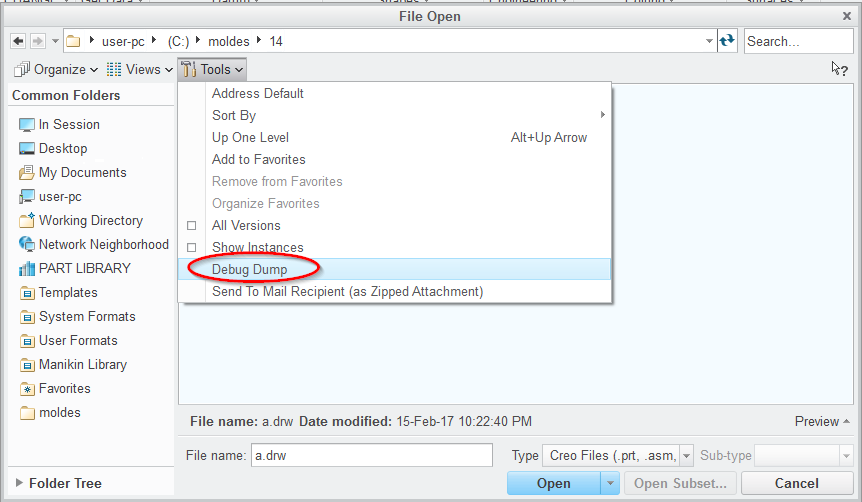
2017-02-20 22_23_47-New notification.png

Any config option to bring it back again?

I use this in some automation tasks to captures lists of files

3 replies

KenFarley
21-Topaz II
February 21, 2017

Is that info that could be pulled from the trail file?

12-Amethyst
February 21, 2017

No, I don't know for sure the use of this command, but it created a file "file_open.dbg.1" in working directory with the list of files that appear in file open dialog.

For example, you call open file command, then filter for just drawing files that start with "1000", then call this command and you will get that list of filtered files.

I used this in Trailmaker 0.3

The content of the file appears this way (example):

<drawing16x16>   a.drw

<asm_image>   b.asm

<asm_image>   b_inst<b>.asm

<asm_image>   b_inst1<b>.asm

<asm_image>   b_inst2<b>.asm

<prt_image>   b.prt

<prt_image>   b_inst<b>.prt

<prt_image>   b_inst1<b>.prt

<prt_image>   b_inst2<b>.prt

Jose

12-Amethyst
February 23, 2017

Can someone check if this option exists in recent releases, please?

Thanks

KenFarley
21-Topaz II
February 24, 2017

I'm running Creo 2 M200 and that selection is not in the menu.

12-Amethyst
March 1, 2017

Ok, thank you all.

It seems that I have to search for another workaround. PTC has closed this door!

I think that I will have to dive in Jlink.