
4-Participant
April 24, 2025
Solved

Fraction format

  • April 24, 2025
  • 1 reply
  • 837 views

I am using Creo 10.0.7.0.

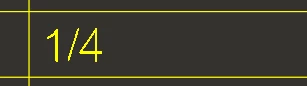
I have created a table in a Creo drawing where I want to enter values—particularly fractional values—in a specific format, as shown in the first image below. However, I haven’t been able to figure out how to achieve this formatting.

I’ve tried adjusting the config.pro settings and other available options, but it's still not working. Currently, the values appear as shown in the second image. I hope you can see the difference in formatting between the two examples.

VK_7_1-1745491144490.png

VK_7_2-1745491282454.png


Best answer by MartinHanak

Hi,

probably the only solution is to create custom symbol.

1 reply

24-Ruby III
April 24, 2025

Hi,

probably the only solution is to create custom symbol.

VK_74-ParticipantAuthor
4-Participant
April 24, 2025

Can you please help me to create that symbol?

VK_74-ParticipantAuthor
4-Participant
April 24, 2025

In the custom symbol we need to take the numerator and denominator as input from user.