1-Visitor
November 10, 2020
Solved

Freeze selection when OTK ui is launched.

  • November 10, 2020
  • 1 reply
  • 1545 views

Hi,


I have a UI created for OTK application. There is button which when pressed allows user to select a face which will be processed later. We use pfcSession->select() for selection. Once selection is done, user presses middle click to complete the selection.


User requirement- When selection of the face is completed, by pressing 'Ok'/middle click, I want to stop any further redundant selection. Selection should happen only when pfcSession->select() is On.


Please help.


Thanks

 

Best answer by FV_01

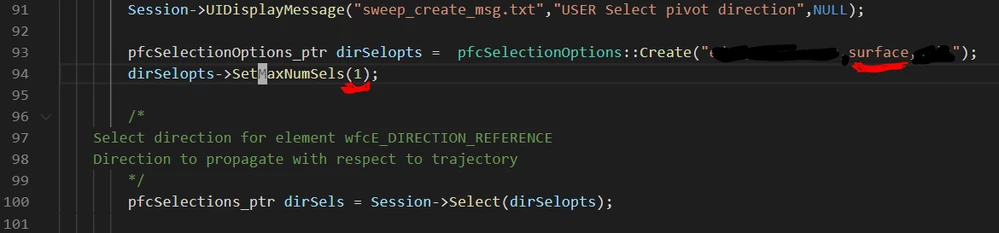
This is how to limit a number of possible selections to 1:

  • follow the example in 'Common Files\otk\otk_cpp\otk_examples\otk_examples_feat\OTKXCreateSweep.cxx'
  • make sure "surface" option is specified and max number of selections is set to 1.


FV_0-1605043942798.png


Without seeing your dialog control loop it is impossible to tell what is 'On' state and what is 'Off' state.


BTW - Pro/Toolkit has enum ProSelectionEnvAttr which alters behavior of interactive selection such as showing Ok/Cancel dialog box, requiring Ok-button-click to finish interactive selection process and so on.

1 reply

FV_0117-PeridotAnswer
November 10, 2020

This is how to limit a number of possible selections to 1:

  • follow the example in 'Common Files\otk\otk_cpp\otk_examples\otk_examples_feat\OTKXCreateSweep.cxx'
  • make sure "surface" option is specified and max number of selections is set to 1.


FV_0-1605043942798.png


Without seeing your dialog control loop it is impossible to tell what is 'On' state and what is 'Off' state.


BTW - Pro/Toolkit has enum ProSelectionEnvAttr which alters behavior of interactive selection such as showing Ok/Cancel dialog box, requiring Ok-button-click to finish interactive selection process and so on.