17-Peridot
October 25, 2018
Question

GUI for symbol instance preview?

  • October 25, 2018
  • 2 replies
  • 3055 views

Hello!

How do you think, what GUI component is using for symbol instance preview?
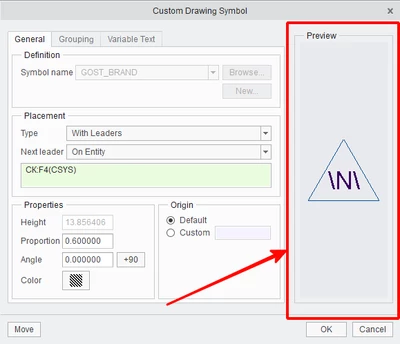
img-2018-10-25-15-11-50.png

2 replies

1-Visitor
October 26, 2018

Label and setting image file with ProUILabelBitmapSet() API should work.

17-Peridot
October 26, 2018

@Ketan_Lalcheta

This is good if you have predefined picture.

But I want to draw symbol instance on the fly, how Creo is do.

One way is collect all items from symbol instance and draw into Drawing area component. But it is not very easy!

1-Visitor
October 26, 2018

Yes, It is the best way to do same. But I would go with 5 to 7 image available as different symbol representation and show specific image for concerned symbol.


This would save considerable amount of effort, but it is not the best solution.

RPN
18-Opal
December 1, 2018

Parsing the symbol is painful, but what you can do is:


  1. Create your own plotter driver
  2. open a symbol in a tmp drawing
  3. use you plotter driver and render your symbol

A plotter driver is not that complicated, you have only to bind a couple of primitives, like text, lines, arcs... If you have something like a canvas to draw in PTC‘s GUI you can bind the driver function to draw your symbols. You may have an Bounding Box issue, but this should be solvable 🙃
