
1-Visitor
October 12, 2015
Solved

How 2 remove option from the SaveACopy/Type list...

  • October 12, 2015
  • 2 replies
  • 3599 views

Hi,

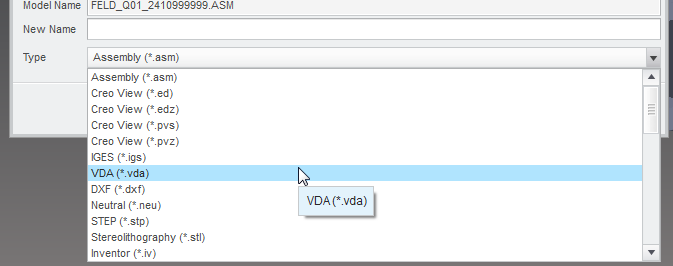
does anybody know if it is possible to remove an option from the type list in file browser dialog "File / SaveAs / Save A Copy"???

I want to remove an option because I created a new Toolkit function that the user has to use instead of the OOTB function (different coordinate system by default and so on...).

I cannot find a list in the Creo install dir that allows me to remove options....

Thanks for any comments.

Andreas

This thread is inactive and closed by the PTC Community Management Team. If you would like to provide a reply and re-open this thread, please notify the moderator and reference the thread. You may also use "Start a topic" button to ask a new question. Please be sure to include what version of the PTC product you are using so another community member knowledgeable about your version may be able to assist.
Best answer by FV_01

Hi all,

Andreas, if you modify your requirements as "no STEP file to be available as a result of 'Save As' OOTB command" you would have more options to handle the situation...

The most logical way would be to delete the OOTB step file and instantly generate your own via ProMdlCopy...Action but I don't think the action function would be triggered for IGES/STEP/PARASOLID...

You could somewhat replicate this approach by using a bracket function over 'SaveAs' along with the trail file parser... The idea is to make a bracket function 'after execution' event to read at the end of the trail file - the full path of the output file will be listed there. If the file was indeed a STEP one then copy its path, delete the file, notify the end user about it and /or make your own STEP file at the same location. You would have some cumbersome workflow and a couple of unhappy users which would need to wait through output only to find out that the file was deleted if you would choose just to remove the wrong data...

HIH.

Feliks.

2 replies

24-Ruby III
October 12, 2015

Andreas,

file format list is not customizable.

MH

23-Emerald IV
October 12, 2015

You can adjust the sort order with the config.pro option preferred_save_as_type.  Maybe this will help...

preferred_sort_order.PNG

24-Ruby III
October 12, 2015

Tom,

I am not able to put preferred_save_as_type option into operation in CR2... .

MH

15-Moonstone
October 13, 2015

There is this callback action, I think it should do what you want to do?

I don't know if you can overwrite file handlers with the ProFileSaveRegister dialog, or if the function is called also for other file types.

Br,

Eike

Callback ProFileSaveAccessFunction

Description
Callback function to decide if the file type should be selectable in File 'Save a Copy' dialog or not.
Synopsis
#include <ProUtil.h>
ProBoolean(*ProFileSaveAccessFunction)(
wchar_t* file_type
/* (In)
File type
*/
ProMdl model
/* (In)
The handle of the model being saved
*/
ProAppData app_data
/* (In)
The application data
*/
)
Returns
PRO_B_TRUEFile type should be added in the file dialog.
PRO_B_FALSEFile type should not be added in the the dialog.

Manual References:

  1. Core: Utilities: File Handling
1-Visitor
October 13, 2015

Hi Eike,

thanks for sharing this idea. As far as I understand these functions in toolkit they can be used to register a new file type in the SaveAs dialog.

I will try to replace an existing option with a new one.

2015-10-12: I tried to replace the option "STEP (*.stp)" with a new function by using ProFileSaveRegister() - but unfortunately it seems that the default options from Creo cannot be overwritten....

Andreas

14-Alexandrite
October 13, 2015

Is it possible to use a notification function? Set either ProMdlCopyPostAction or ProMdlCopyPostAllAction to call your custom export.

This way even if the user selects the OOTB save as command the file will be overwritten with the correct one.

In theory it should work but I have to admit that I didn't get the chance to try if it works.