
17-Peridot
August 17, 2023
Solved

How can I translate buttons to Russian in Creo?

  • August 17, 2023
  • 1 reply
  • 1382 views

Hello everybody
I am using Creo 7.0.2.0.
My interface language is set to Russian.
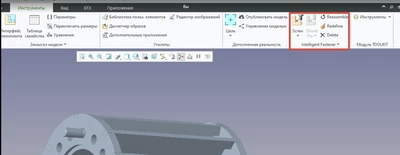
However, there is a section called "Intelligent Fastener" under the "Tools" tab, and it is in English.
Could you please advise me on how I can translate the buttons in this section to Russian?
VladiSlav_0-1692286613217.png


I have tried searching various settings, but I have not found anything.

Thank you for your assistance,


Best answer by JB_87049

IFX is a module developed by B&W Software in Germany using ProToolkit. I thought they only provided an English version.
What you could try is the following.
Take a look at \ptc\Creo x.x.x.x\Common Files\text\usascii
There are a number of .txt files in that folder.
You could try translating the text in those files.
The text is grouped by three. Don't change the first line of the group.
\n means next line. So don't change this either.
I have never tested this myself. So I don't know for sure whether this will work or not.

1 reply

JB_8704915-MoonstoneAnswer
15-Moonstone
August 17, 2023

IFX is a module developed by B&W Software in Germany using ProToolkit. I thought they only provided an English version.
What you could try is the following.
Take a look at \ptc\Creo x.x.x.x\Common Files\text\usascii
There are a number of .txt files in that folder.
You could try translating the text in those files.
The text is grouped by three. Don't change the first line of the group.
\n means next line. So don't change this either.
I have never tested this myself. So I don't know for sure whether this will work or not.

VladiSlav17-PeridotAuthor
17-Peridot
August 22, 2023

JB_87049, thank you very much for the information