
18-Opal
May 10, 2018
Question

How do I extract the file names of the model tree and certain parameters in tabular format?

  • May 10, 2018
  • 1 reply
  • 5623 views

Hello, everyone


In Creo, you can extract parameter tables in csv or txt format from the Parameters window.
However, this table is separated by commas, and if opened in Excel, all values are displayed in one column
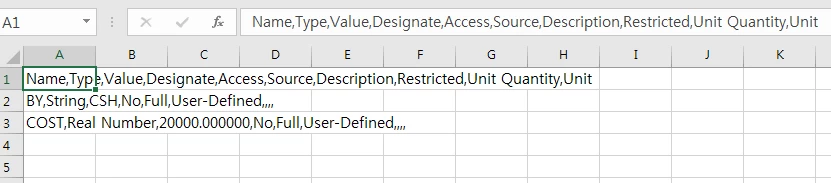
image13.png

We are going to use the toolkit to extract tables of a format similar to the BOM
One column has a list called File Name.
One or more other columns are the names of specific parameters
Maps the name of the file and the value of the parameter in the model tree (all objects in the session).
So I want to get the following table.
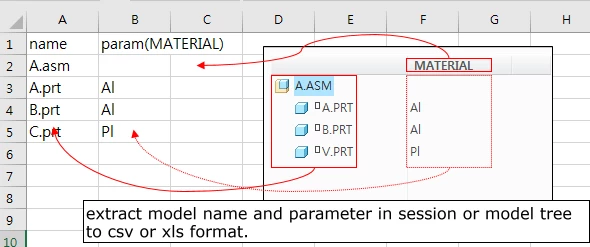
image12.png

How do I extract the filename and specific parameters of a model tree to a table format?

1 reply

1-Visitor
May 10, 2018

If you tell Excel it's in CSV format it will put the data in separate columns. I guess you could change the suffix to ".csv"


You can also use Data-> Text to Columns to split a single cell that has comma separated values.

CHASEONHO18-OpalAuthor
18-Opal
May 10, 2018

@dschenken thank you 

but, The point of my question is not the division of the table row in a EXCEL.
The goal is to get the same table as the second figure.
Gets the name of the model in the session as a single column.
The specific parameters of each model (MATERIAL in the figure) are imported as a separate column.
Export the generated table in csv or xls format.
thanks