10-Marble
January 11, 2023
Question

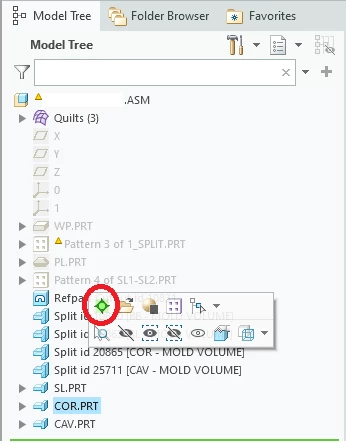
How to activate the model with Creo Object TOOLKIT or TOOLKIT, which function can be activated?

  • January 11, 2023
  • 3 replies
  • 4062 views

How to activate the model with Creo Object TOOLKIT C++, which function can be activated?
 

Untitled.png

3 replies

15-Moonstone
January 11, 2023

you can select (put into selection buffer) feature and then run macro to activate model (~ Command `ProCmdMakeActive`)

10-Marble
January 12, 2023

After running the macro, the Toolkit program will lose control of CREO . So I can't use macros to activate.

15-Moonstone
January 12, 2023

I have not used c++ toolkit yet but in jlink there are 2 functions RunMacro (return handle to Creo) and ExecuteMacro (return handle to toolkit app)

if there is no such function in c++ TK you can try this trick:

register 2 commands with these functions;

1. do the stuff you need then run macro to activating the model and running second macro (eg ~ Command `ProCmdMakeActive`; ~ Command `MyCustomCommand`)

2. do the rest what you need

tbraxton
22-Sapphire II
22-Sapphire II
January 11, 2023

Use ProWindowActivate() to activate the specified window

See application example:

https://www.ptc.com/en/support/article/CS288287

10-Marble
January 12, 2023

Instead of activating the window, activate the model.

17-Peridot
January 12, 2023

What do you want to do with active model?

To work with the model from the toolkit application, activation of the model is not required.


10-Marble
January 13, 2023

I want to cut the solid of component B with the quilt of component A .

Now I realize that I don't need to activate the model, but I failed to create the solidify feature because I couldn't select the quilt of component A.


17-Peridot
January 13, 2023

I think, pfcModelItemOwner::ListItems can help you to collect surfaces from A model.
