
12-Amethyst
June 4, 2024
Question

How to add parameter callout to sketcher pallete.

  • June 4, 2024
  • 2 replies
  • 2815 views

Hi All,

What I am trying to acheive is to create a text string and symbol to be used as an item from the sketcher palette.


The scenario is this. 

I want be able to create sketch palette item which has a cavity number id reference # and the part number.
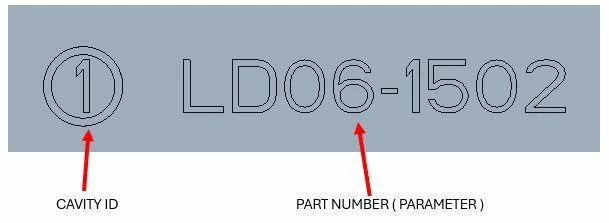
Part_number & cavity id.JPG

However when I create the sketch for this and want to add text, it does not give me the option to add the parameter it only gives a text option. If I add the parameter name in the text box and save this to the sketcher palette. When I call up this sketch from the sketcher palette in a part, I do not get the part number from the parameter in the model, I just get the text ( &part_number).
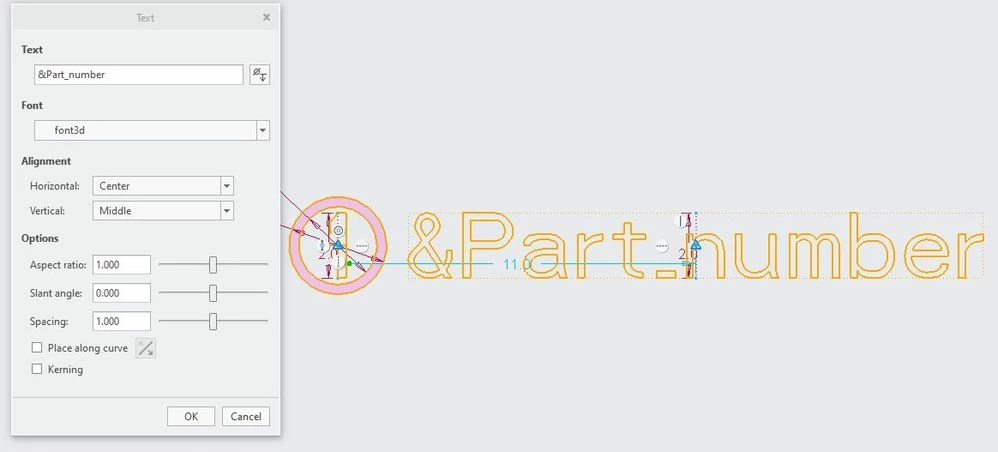
Part_number & cavity id 2.JPG

The part number is a parameter in my start part and subsequent modelled parts.


The only way I can get this to work is to insert this sketch from the palette and then edit the inserted sketch by selecting the parameter.
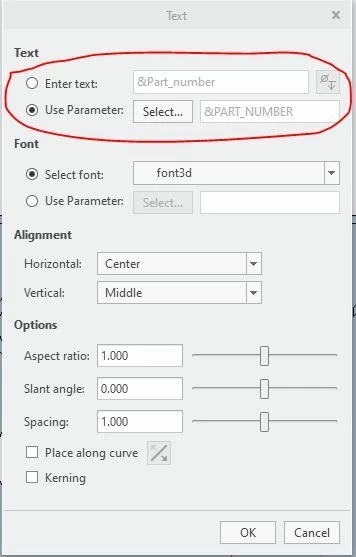
Part_number & cavity id 3.JPG

Is there a way to add the parameter to the sketch in the palette section, without the need to do a secondary edit.


Any suggestions welcome. Thanks.


I am using Creo 8.0.3.0.

2 replies

13-Aquamarine
June 4, 2024

Hi Paul,


Try creating the sketch in a part model. It sounds like you're starting as a sketch - and therefore, the Use Parameter radio button is not available. Try the same thing in a sketch created in part mode, and the option will be there.


Once the sketch is created, you can save it from within the sketch interface. The resultant sketch (.sec) file will preserve the parameter. The file can now be included with your sketcher palette.


Good luck!

-Brian

Paul612-AmethystAuthor
12-Amethyst
June 4, 2024

Hi Brian, 

Thanks for your reply, I have tried this approach, and the behaviour I am seeing is that saved sketch from within the part only holds the paramater value of that part in the sketch for the palette. So when I use that sketch from the palette for a new part the parameter value is shown of the old part ( where the .sec file was created). 


Again the only way I seem to be able to rectify this is a secondary edit to the inserted sketch from the palette and selecting the parameter radio button in stead of text.


13-Aquamarine
June 4, 2024

I have a few thoughts about ways to circumvent this behavior - one would be to utilize a UDF instead of the sketcher palette. Of course, I never like when someone fails to answer my question and suggests an alternative approach.


After looking at this for a bit, I'm convinced that once you save out the section, the parameter is simply lost and converts to "dumb" text. Under the circumstances, these less-attractive options may offer some benefit:

(1) using a user-defined feature (UDF) to load/p[ace your sketch

(2) using a mapkey which places the section and immediately updates the text to use the desired parameter


Community Moderator
June 10, 2024

Hello @Paul6


It looks like you have some responses from some community members. If any of these replies helped you solve your question please mark the appropriate reply as the Accepted Solution. 

Of course, if you have more to share on your issue, please let the Community know so other community members can continue to help you.

Thanks,
Community Moderation Team.