
24-Ruby III
March 1, 2017
Question

How to assign model name to default CSYS

  • March 1, 2017
  • 4 replies
  • 7792 views

This discussion is my reaction to CSYS name should alway be the Part Name idea.


Attached CSYS_rename_CR3_prvek4.zip file contains following files:
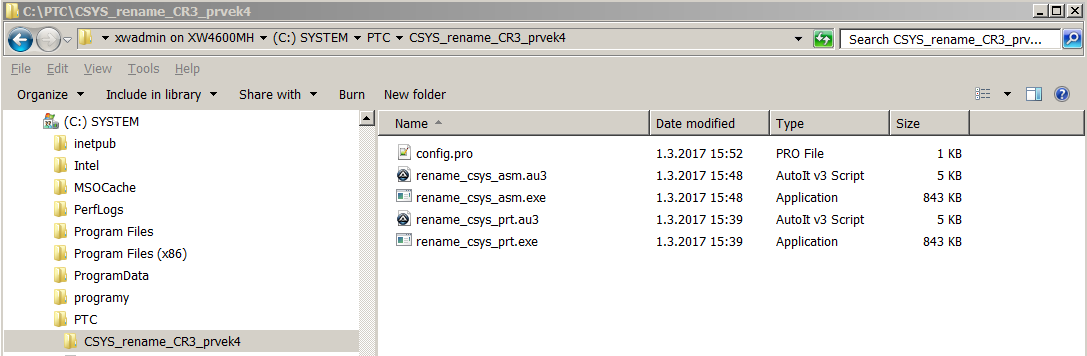
 

How to install script:

  1. create C:\PTC directory
  2. save zip file into C:\PTC directory
  3. unzip zip file into C:\PTC directory to get structure show on picture
  4. open config.pro file and copy two lines into your config.pro


How to run script:

  1. launch Creo 3.0 (in my case it is M100, English version)
  2. open part
  3. run mapkey dd1
  4. open assembly
  5. run mapkey dd2


Notes:

  • .au3 ... source file
  • .exe ... compiled source file
  • if you unzip zip file into directory different from C:\PTC, then you have to modify path defined in config.pro
  • notes in source file are written in Czech language, I hope that translate.google.com transfers Czech texts into English properly


Good luck !


Martin Hanak

4 replies

10-Marble
March 1, 2017

Hi Martin!,

Thank you for this tool with source code. This gives a whole new level to Creo Mapkeys combined with external application. And it's pretty clever how you did the renaming.

I didn't know, something like this is possible! I cannot say my thanks with words!

I wanted to ask, if you could share the $F2-mapkey you are using for this renaming method of CSYS. I have original scripts from IPM with $F2 for opening model tree, so the .exe files don't work for me.

Thanks again and I wish you the best!

24-Ruby III
March 1, 2017

Hi,

I don not understand well your last paragraph:

I wanted to ask, if you could share the $F2-mapkey you are using for this renaming method of CSYS. I have original scripts from IPM with $F2 for opening model tree, so the .exe files don't work for me.

My guess ... you want call mapkey by clicking F2 key instead of clicking dd1 key combination. If this is the case then simply change config.pro line using Notepad.

mapkey dd1 @SYSTEMstart C:\\PTC\\CSYS_rename_CR3_prvek4\\rename_csys_prt.exe;

to

mapkey $F2 @SYSTEMstart C:\\PTC\\CSYS_rename_CR3_prvek4\\rename_csys_prt.exe;

MH

Chris3
21-Topaz I
March 2, 2017

I think he was looking at the .au3 source code which calls the F2 key

1-Visitor
March 1, 2017

This method will rename the csys to match the part number only or will it automatically match the csys name when I create a new part?

24-Ruby III
March 1, 2017

Hi,

the mapkey renames coordinate system (feature no.4) in model tree.

MH

24-Ruby III
March 2, 2017

Short video showing dd1 and dd2​ results.

1-Visitor
May 15, 2018

Not useful solution

RPN
18-Opal
May 20, 2018

In Tcl I need one Line of code for this:


ps_feat set_name [lindex [ps_visit type csys] 0] [file root [ps_model cur]]


Next a procedure, which is more save:


FirstCsysNameToModelName.png


Here a movie ... 


1-Visitor
May 20, 2018

Not a usable solution.

RPN
18-Opal
May 21, 2018

You are almost right, but p-Shell is running in a SandBox, you need to copy one folder only.

pEnv.png

The "PNG" shows the env, the movie shows what happen if you add a new folder to your SandBox programs.


  1. Start the Csys app,
  2. keep it running,
  3. do the source code edit
  4. Source the edited file again
  5. Run the newly created button

This is not a final app, but should show how easy it is to make an update or test new code.


Note: This Tcl program run in synchronous mode.

Cheers