12-Amethyst
June 26, 2023
Solved

How to change from English to German in Creo 7.0.4.0?

  • June 26, 2023
  • 2 replies
  • 2991 views

I want to switch the language from English to German.  I added the line in the .psf file for german, but it has no effect.


Best answer by MartinHanak

@JMack wrote:

Could I just run the reconfigure.exe and select German or do I have to do a full uninstall and reinstall?


Hi,

if my installation does not meet some requirements I always do full uninstall and then clean install.


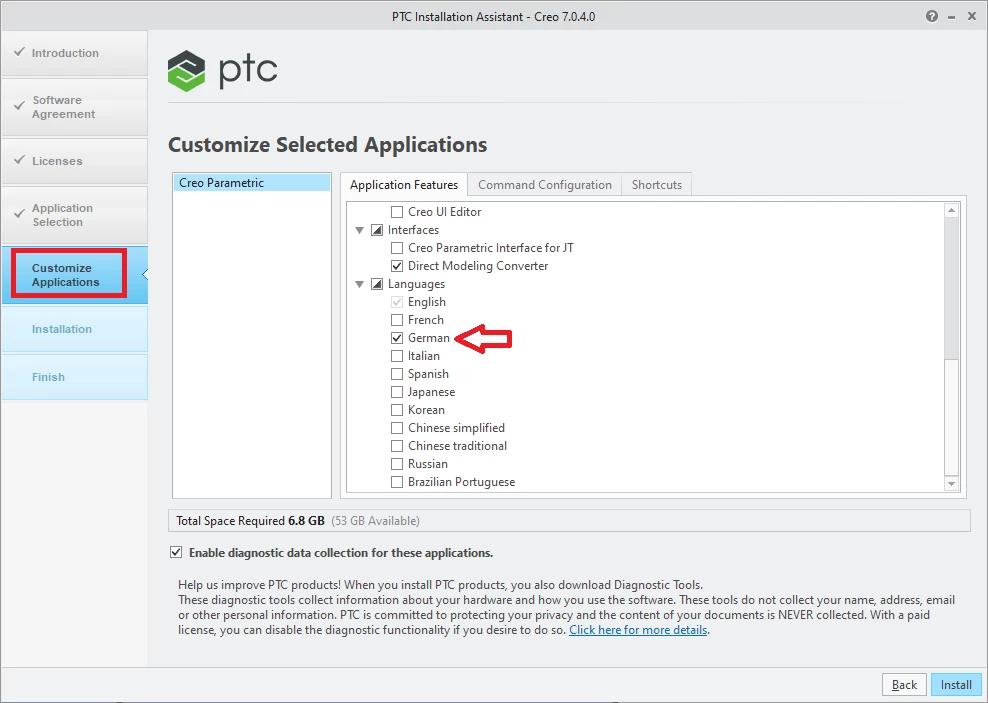
German localization installation - see following picture
MartinHanak_0-1687848891931.png

Finished installation includes English + German localization.


By default Creo uses localization which correspond to Windows localization setting. This means in German Windows Creo starts in German language. To switch to English language, add following options to config.pro file:

dialog_translation no
help_translation no
msg_translation no
menu_translation no


2 replies

23-Emerald III
June 26, 2023

Was Creo 7.0.4.0 installed with the language set to German?

JMack12-AmethystAuthor
12-Amethyst
June 26, 2023

No.


24-Ruby III
June 26, 2023

Hi,

by default only English localization is installed. During installation you have to select German language as additional language.

So you have to uninstall/install Creo.

JMack12-AmethystAuthor
12-Amethyst
June 26, 2023

I've never seen that option, but I wasn't looking for it.  Where during installation is that option provided?  CAn I have both English and German installed at the same time and switch back and forth?
