13-Aquamarine
May 23, 2022
Solved

How to change the default action in conflict prompt

  • May 23, 2022
  • 1 reply
  • 1930 views

Is there a way to change the default action in the conflict prompt from "Check out now" to "Make Read-only" for example?
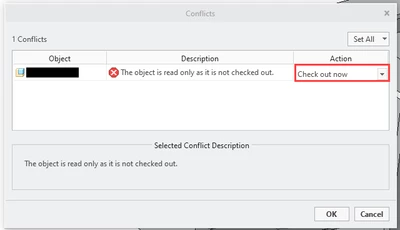

 

ChangesPrompt.png

Best answer by TomU

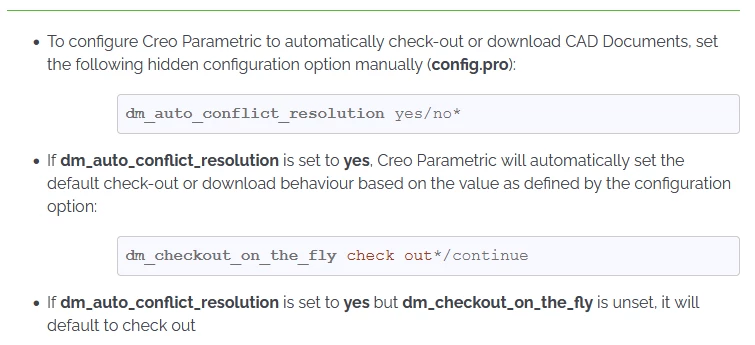
Not, via this dialog.  You can default to the other values.  See https://www.ptc.com/en/support/article/cs44835


TomU_0-1653320933244.png


For 'Read Only', consider setting the Windchill preferences that automatically set everything added to your workspace as read only.


https://www.ptc.com/en/support/article/cs76228


https://www.ptc.com/en/support/article/cs334870


https://support.ptc.com/help/wnc/r12.0.2.0/en/#page/Windchill_Help_Center%2FCADxFileMenuObjAdd.html


1 reply

TomU23-Emerald IVAnswer
23-Emerald IV
May 23, 2022

Not, via this dialog.  You can default to the other values.  See https://www.ptc.com/en/support/article/cs44835


TomU_0-1653320933244.png


For 'Read Only', consider setting the Windchill preferences that automatically set everything added to your workspace as read only.


https://www.ptc.com/en/support/article/cs76228


https://www.ptc.com/en/support/article/cs334870


https://support.ptc.com/help/wnc/r12.0.2.0/en/#page/Windchill_Help_Center%2FCADxFileMenuObjAdd.html


13-Aquamarine
May 24, 2022

Fantastic, thank you for the all the information on this topic!