5-Regular Member
May 4, 2026
Question

How to delete certatin notes by mpakey or modelchek...
  • May 4, 2026
  • 3 replies
  • 63 views

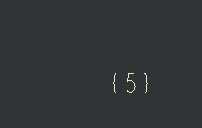
for MBD files i’ve made revisions after that i need to clear the notes like


{5}

, so that is their any way to clear them, i tired by mapkeys or modelcheck but couldn’t get exact way..

Pls let me know any possible scenorios 

Thanks in advance 

3 replies

17-Peridot
May 5, 2026

This is going to depend a lot on how they were created and where… 

Do you have a sample model / drawing for this condition?

You might take a look at Nitro-CELL - you can use the FREE license for light work. (requires JLINK to be installed with your Creo Parametric).

https://simplifiedlogic.com/docs/nitro-cell-commands/tbl_note_get/

https://simplifiedlogic.com/docs/nitro-cell-commands/tbl_note_delete/

Hope this helps.


Dave

5-Regular Member
May 6, 2026

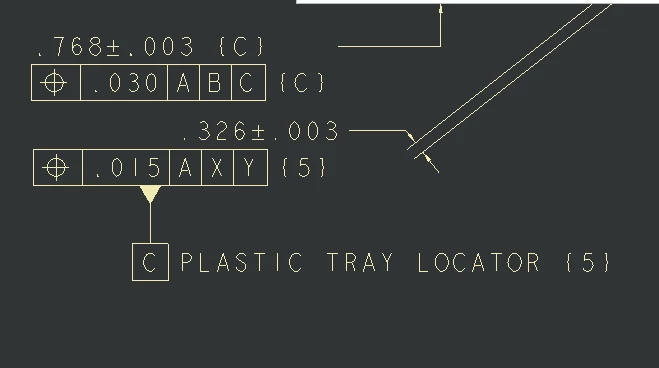
attached a sample file,, in that if find the {5}  is not required much, rater than manual way to delete that… any automate way to pulk that out from my MBD’s . its save Quality errors while im ready to revision or didn’t need old revision  tag’s.


17-Peridot
May 7, 2026

Ok - The GTols are not accessible without a Toolkit License (so that is a hard one - and I am not sure a mapkey will be able to find and select these easily).  THis may require an RPA external tool to scrape, select, perform an action - similar to a mapkey but an external application doing the magic)

I used Nitro-CELL to demonstrate the quick gathering of notes into a table, and then delete the found notes. (cheap and dirty - but works … for Notes).  More specific filtering could be done with PowerQuery to filter down to your specific note/content of concern to generate a new table to reference for the deletion of the more scoped notes).

Nitro-CELL Script to gather Notes, write to a table, then delete from using the same table reference
Example of the Notes written to the Excel Table
Before the Operation
Model after the Nitro-CELL Note Deletion - note the GTOL Remains (need Toolkit or another way to get there)

Now… Nitro-CELL has a FREE license you can use to test this… Just go to the site, download the app (and the plugin for text completion) -- and make sure you have JLINK installed with Creo Parametric.  Then launch it and connect to Creo Parametric, and source the Excel File attached… and Press “Do It” and it should work for you. (Excel File attached)


Hope this helps!


Dave


Catalina
Community Moderator
May 14, 2026

Hi ​@PS_10905022 


I wanted to see if you got the help you needed.


If so, please mark the appropriate reply as the Accepted Solution or please feel free to detail in a reply what has helped you and mark it as the Accepted Solution. It will help other members who may have the same question.


Of course, if you have more to share on your issue, please pursue the conversation.


Best regards,

Catalina

PTC Community Moderator

Catalina | PTC Community Moderator