
10-Marble
December 20, 2024
Question

How to enable same numbering logic as Windchill OIR on File Name attribute in Creo

  • December 20, 2024
  • 1 reply
  • 1345 views

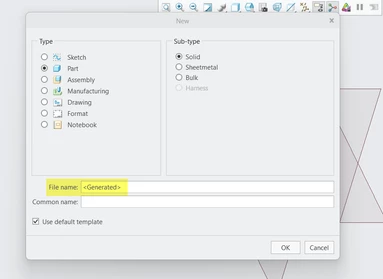
I wanted to enable same numbering logic as Windchill OIR on File Name attribute in Creo while creating new object in Creo.


With current configuration CAD Objects are creates e.g. PRT002.PRT as shown below  :
LB_10619520_0-1734696621958.png

LB_10619520_3-1734697224860.png


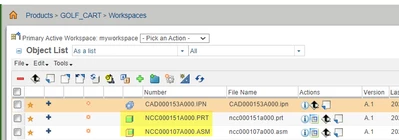
I already can create CAD object as per my define OIR as below :
LB_10619520_1-1734696966782.png


Please help me to get Windchill OIR configure to Creo to create CAD objects with same numbering scheme.

1 reply

RPN
18-Opal
December 20, 2024

Try this 


extern ProError ProMdlObjectdefaultnameGet (ProType object_type, ProLine name);
/*
Purpose: Returns the next available default name for given object type

Input Arguments:
object_type - only these types are allowed:
<ul>
<li>PRO_PART
<li>PRO_ASSEMBLY
<li>PRO_CABLE
<li>PRO_DRAWING
<li>PRO_REPORT
<li>PRO_2DSECTION
<li>PRO_3DSECTION
<li>PRO_LAYOUT
<li>PRO_DWGFORM
<li>PRO_MARKUP
</ul>

Output Arguments:
name - resulting name.

Return Values:
PRO_TK_NO_ERROR - The function successfully created the name.
PRO_TK_UNSUPPORTED - the type is not supported.
*/

WT_01021910-MarbleAuthor
10-Marble
December 22, 2024

HI @RPN , Thank you for your reply.


Could you please elaborate the solution in more detailed to get it implemented?.

I mean I didn't understand the syntax as well as where do I make these changes ? 


Thanks in advance.

RPN
18-Opal
December 22, 2024

Just give the type, the returned string is the same what you would get in Creo by your OIR. Give it a try, it’s easy 😉. So you will not get PRT00?? for PRO_PART. Make sure you are connected to Windchill. Next the Org/Product/Folder will fire the OIR for the returned string value.
