
18-Opal
May 14, 2018
Question

How to extract files(csv or *xls) from Creo?

  • May 14, 2018
  • 1 reply
  • 3953 views

The following tables are created in Creo and exported to csv.
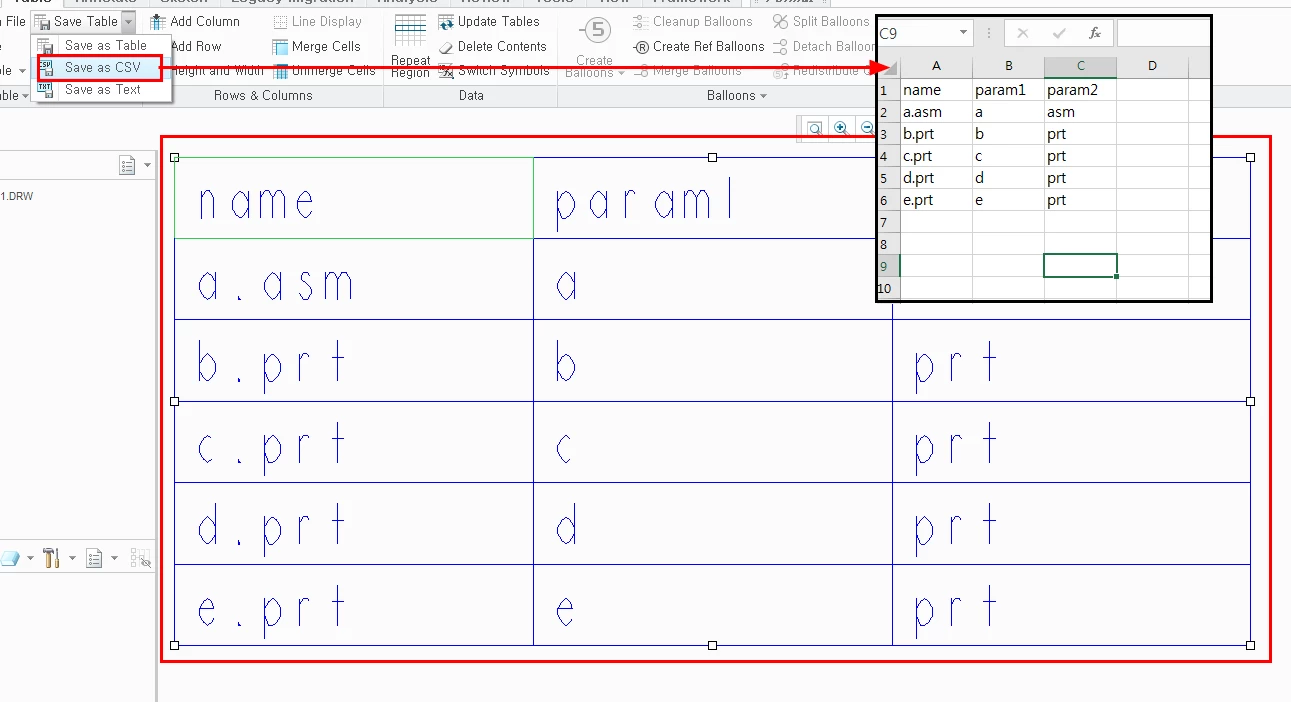
image 1.png
It is similar to what we want to implement.
Therefore, the following points should be considered.
1. Can I create and export the table as shown?
2. Can I export extensions to xls?
3. Can I insert a table into a specific area of an existing Excel file (xls or csv)?


I would like to know if it is possible with a map key or a toolkit.

please teach me how to get that


thanks

regards

1 reply

CHASEONHO18-OpalAuthor
18-Opal
May 15, 2018

When i save the model tree, if i declare the extension as xls, it will be saved as Excel.


However, this does not divide the cell.

As you can see, the tree structure is in one cell.


If possible, it is good to insert data into each cell when the tree is saved as xls.


I also want to be able to control where the tree will be stored as xls (the base structure appears to be inserted sequentially from A1). 

CHASEONHO18-OpalAuthor
18-Opal
May 15, 2018

Or can I save it as xls using ProFileMdlfiletypeSave?

It does not actually save, but it displays the Save dialog in xls format: 

11-Garnet
January 19, 2023

Just export it as csv.
Creo saves it as csv.1
Rename it to .csv

Open it with libre office for instance,
It will put each value in a separate line, divided by the comma that is in the csv file (Comma Separated File),
After you opened/imported it this way, you can save it as an xls or whatever format you need.