

10-Marble
August 4, 2025
Solved

How to hide and unhide a component or part in an assembly with otk java

  • August 4, 2025
  • 1 reply
  • 1221 views

I am using creo object toolkit java to make some secondary developing.

Suppose I have get the ComponentPath of a part or component in an assembly model. Which function can I use to hide and unhide the part or check its hidden status. I read the usergudie a thousand times and could not find one. Belows are functions I have tested.

com.ptc.pfc.pfcModel.Model.Display

com.ptc.pfc.pfcSelect.Selection.Display

com.ptc.wfc.wfcSolid.WSolid.DisplaySolid

Sadly, none of them help.
LJ_13692736_0-1754295533622.png

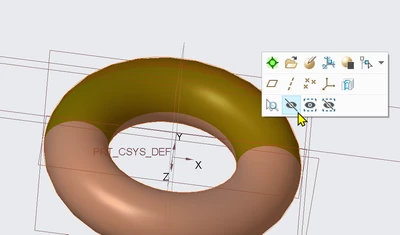
Does the toolkit provide the function to programmatically hide and unhide part, just like hit the button in this picture?

Best answer by LJ_13692736

Thank you very much for your timely reply.

Although the code is not written in Java, it still inspired me a lot.

In summary, the program goes like this:

  • Suppose the part's ComponentPath you want to hide is [40, 43].
  • STEP 1 Get the Model of [40], the part's parent.
  • STEP 2 Get the ModelItem [43] of Model [40].
  • STEP 3 Check if the ModelItem [43] ishidden.
  • STEP 4 If true, unhide it; if false, hide it.

In this way, you can switch the hidden status programmtically.


Here I paste the Java Code.

public void OnCommand() throws jxthrowable {
 // STEP 1 Get the Model of [40], the part's parent.
 Model model = session.GetCurrentModel();
 Assembly assembly = (Assembly) model;
 intseq path = intseq.create();
 path.append(40);
 ComponentPath componentPath = pfcAssembly.CreateComponentPath(assembly, path);
 WSolid solid = (WSolid) componentPath.GetLeaf();

 // STEP 2 Get the ModelItem [43] of Model [40].
 WModelItem modelItem = (WModelItem) solid.GetItemById(ModelItemType.ITEM_FEATURE, 43);

 //STEP 3 Check if the ModelItem [43] ishidden.
 //STEP 4 If true, unhide it; if false, hide it.
 if(modelItem.IsHidden()){
 modelItem.Unhide();
 }else {
 modelItem.Hide();
 }
 }​


Thanks again, VladimirN.

Have a good day!😀

1 reply

24-Ruby III
August 4, 2025

Take a look - "How to hide and unhide with toolkit, check out my code!": https://community.ptc.com/t5/Customization/How-to-hide-and-unhide-with-toolkit-check-out-my-code/td-p/910320 

LJ_1369273610-MarbleAuthorAnswer
10-Marble
August 4, 2025

Thank you very much for your timely reply.

Although the code is not written in Java, it still inspired me a lot.

In summary, the program goes like this:

  • Suppose the part's ComponentPath you want to hide is [40, 43].
  • STEP 1 Get the Model of [40], the part's parent.
  • STEP 2 Get the ModelItem [43] of Model [40].
  • STEP 3 Check if the ModelItem [43] ishidden.
  • STEP 4 If true, unhide it; if false, hide it.

In this way, you can switch the hidden status programmtically.


Here I paste the Java Code.

public void OnCommand() throws jxthrowable {
 // STEP 1 Get the Model of [40], the part's parent.
 Model model = session.GetCurrentModel();
 Assembly assembly = (Assembly) model;
 intseq path = intseq.create();
 path.append(40);
 ComponentPath componentPath = pfcAssembly.CreateComponentPath(assembly, path);
 WSolid solid = (WSolid) componentPath.GetLeaf();

 // STEP 2 Get the ModelItem [43] of Model [40].
 WModelItem modelItem = (WModelItem) solid.GetItemById(ModelItemType.ITEM_FEATURE, 43);

 //STEP 3 Check if the ModelItem [43] ishidden.
 //STEP 4 If true, unhide it; if false, hide it.
 if(modelItem.IsHidden()){
 modelItem.Unhide();
 }else {
 modelItem.Hide();
 }
 }​


Thanks again, VladimirN.

Have a good day!😀

24-Ruby III
August 5, 2025

You're welcome.