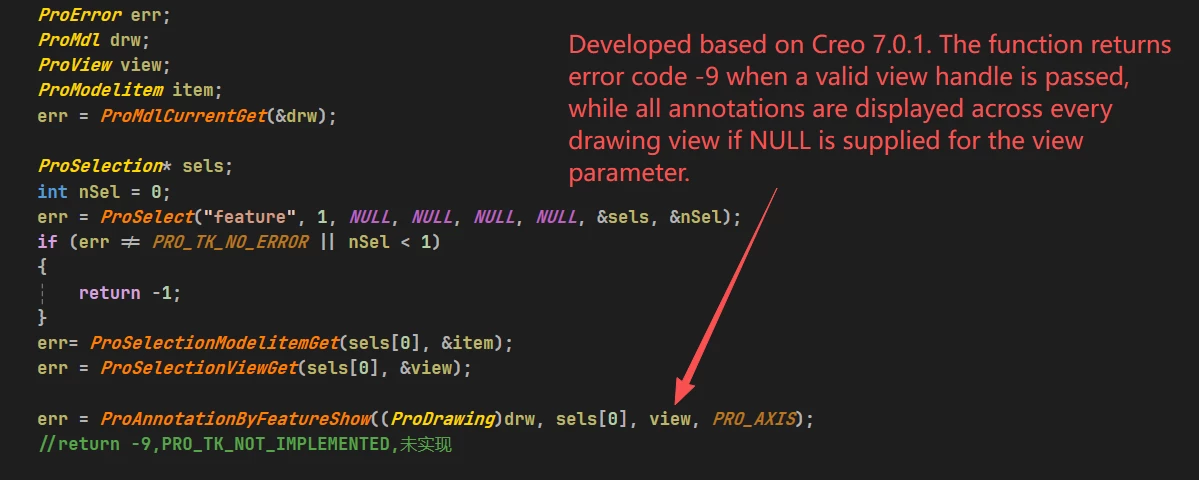
Is there a bug in the ProToolkit API function ProAnnotationByFeatureShow?
According to the developer guide tkusetoc, this function supports passing a drawing view argument to display annotations only in the target view starting from Creo Parametric 2.0 M060. The official documentation states:
From Creo Parametric 2.0 M060 onward, you can specify the view in which the annotations for the selected feature and component must be displayed. For the functions ProAnnotationByFeatureShow() and ProAnnotationByComponentShow(), specify the view where the annotations must be displayed. If you pass the input argument view as NULL, the annotations are displayed in all the views.
However, during practical development, the function returns error code -9 (PRO_TK_NOT_IMPLEMENTED) whenever a valid non-NULL ProView handle is passed to the view parameter. When passing NULL to the view argument, all annotations are displayed across every drawing view as documented, which works as expected. My business requirement is to show feature annotations exclusively in a single specified drawing view only.
I am developing based on Creo 7.0.1.