
12-Amethyst
May 6, 2024
Solved

Keyboard Shortcut Conflict Default

  • May 6, 2024
  • 2 replies
  • 2099 views

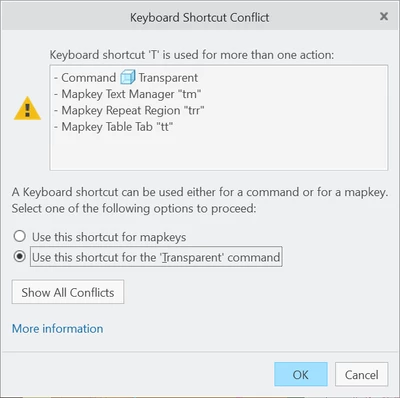
I'd like the "T" shortcut to permanently be mapped to a command, not a map key. So I click on the command option. However, whenever I restart Creo, it forgets my selection and this dialogue box appears again. How do I make it remember my selection by default (automatically)? I am running Creo 10.
 

JR_10680659_0-1715018670767.png


Best answer by tbraxton

The reason you are presented with this "problem" every time you start Creo is because it is loading the config.pro file with the conflicting mapkeys which start with "T". Comment out all of the conflicting mapkeys noted and then restart Creo; the issue should not occur. If this does not resolve the issue, then report back here with details of what happens.

2 replies

23-Emerald III
May 6, 2024

Never use a single letter for a shortcut or mapkey!

12-Amethyst
May 6, 2024

okay... do you know the answer to my question though?


tbraxton
22-Sapphire II
tbraxton22-Sapphire IIAnswer
22-Sapphire II
May 6, 2024

The reason you are presented with this "problem" every time you start Creo is because it is loading the config.pro file with the conflicting mapkeys which start with "T". Comment out all of the conflicting mapkeys noted and then restart Creo; the issue should not occur. If this does not resolve the issue, then report back here with details of what happens.

Dale_Rosema
23-Emerald III
23-Emerald III
May 6, 2024

Check this out -conflicts between mapkey and short cut keys:


https://community.ptc.com/t5/System-Administration/Mapkey-Shortcut-Key-conflicts/m-p/568901