15-Moonstone
January 30, 2025
Solved

Leave CREO PTC with two languages

  • January 30, 2025
  • 1 reply
  • 913 views

Hello

I would like to know if it is possible to leave CREO with two languages, when it opens I can select which one I want.

Best answer by GabrielZaha

This is described in Article CS147730 

Let's assume you want English and German.

Locate your parametric.psf file under <Creo load point>\Parametric\bin.

Make a copy of parametric.psf and name it parametric_g.psf


Edit parametric.psf: Change the DESC line like this : DESC=Creo Parametric - English

At the end of the file add the following line

ENV=PRO_LANG=english


Edit parametric_g.psf.

Change the DESC line like this : DESC=Creo Parametric - German

At the end of the file add the following line

ENV=PRO_LANG=german


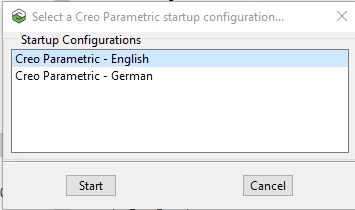
When you start Creo you should see a dialog box like this:
Untitled.png

1 reply

14-Alexandrite
January 30, 2025

This is described in Article CS147730 

Let's assume you want English and German.

Locate your parametric.psf file under <Creo load point>\Parametric\bin.

Make a copy of parametric.psf and name it parametric_g.psf


Edit parametric.psf: Change the DESC line like this : DESC=Creo Parametric - English

At the end of the file add the following line

ENV=PRO_LANG=english


Edit parametric_g.psf.

Change the DESC line like this : DESC=Creo Parametric - German

At the end of the file add the following line

ENV=PRO_LANG=german


When you start Creo you should see a dialog box like this:

Untitled.png

RPN
18-Opal
January 30, 2025

You nailed it. I thought about to change at run time. Your answer is quite short and perfect in my point o.v. 😉
