
10-Marble
July 26, 2022
Solved

Library Missing from OTK_Install make file for Visual Studio
  • July 26, 2022
  • 1 reply
  • 1293 views

otk.PNG


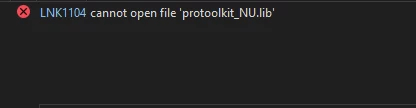
I am trying to follow the object toolkit guide Getting Started with Creo® Object TOOLKIT C++ (ptc.com) to get the object toolkit for creo 8, and am stuck on step 11 due to this error. Did I miss an install option or how do I get ahold of this library?

Best answer by MH_10366957

To solve both of the issues that I had, I needed to make sure I installed the Protoolkit for C along with the Object toolkit for C++. For Creo 8.0.5.0, when trying to build the Visual Studio otk_install.sln file, I needed to make sure that I was on the 8.1 SDK but also be on the V143 of the platform toolset instead of V140

1 reply

10-Marble
July 26, 2022

I installed the C toolkit as well which gave me the needed libraries, however I am now receiving these errors when trying to build the make file

lnk_error.PNGlnk_error2.PNG

MH_1036695710-MarbleAuthorAnswer
10-Marble
July 27, 2022

To solve both of the issues that I had, I needed to make sure I installed the Protoolkit for C along with the Object toolkit for C++. For Creo 8.0.5.0, when trying to build the Visual Studio otk_install.sln file, I needed to make sure that I was on the 8.1 SDK but also be on the V143 of the platform toolset instead of V140