
1-Visitor
December 7, 2015
Question

Lizenzfehler continuation

  • December 7, 2015
  • 1 reply
  • 3667 views

Hi Martin Hanak,

I was not allowed to reply your last answer, so i start a new discussion.

No C:\Programme\FLEXnet Admin License Server\logs does actually not exist on my pc.

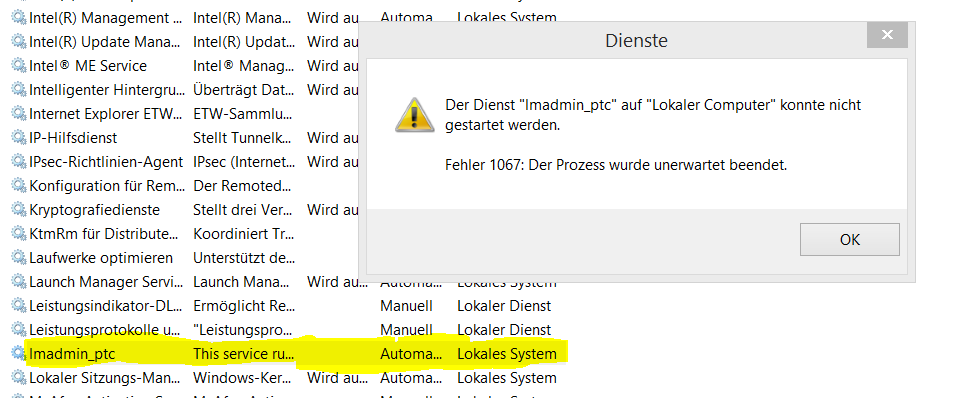
When i start the service lmadmin_ptc there comes the following error message...ptc2.PNG
MR


This thread is inactive and closed by the PTC Community Management Team. If you would like to provide a reply and re-open this thread, please notify the moderator and reference the thread. You may also use "Start a topic" button to ask a new question. Please be sure to include what version of the PTC product you are using so another community member knowledgeable about your version may be able to assist.

1 reply

24-Ruby III
December 7, 2015

Hi,

select lmadmin_ptc service, press right mouse button and open Properties dialog box. On General tab you will find Path to executable item. If this path&file does not exist then license manager has been deleted from your PC and you have to install it again. If it exist then locate log subdirectory, zip it and send me zip file using How to attach file when you Reply to a discussion. procedure.

MH

1-Visitor
December 7, 2015

Hi,

ptc3.PNG

When i want to copy the marked adress and search it in my pc, the adress does not exist.

So i have to install it again ?

24-Ruby III
December 7, 2015

Hi,

you are right, you need to install license manager. Prerequisities for this step are:

  • you need installation DVD (or its copy on harddisk)
  • you need license file

If you do not have both of them, then you are lost .

MH