14-Alexandrite
November 28, 2022
Solved

Macro i want select the FEATURE ID and not the node

  • November 28, 2022
  • 2 replies
  • 1386 views

Hi,

I want to select a feature using a macro, but instead of writing ID FEATURE, Creo use the NODES.


Example:

mapkey(continued) ~ Select `main_dlg_cur` `PHTLeft.AssyTree` 1 `node3238`;\


Is it possible to write:

mapkey(continued) ~ Select `main_dlg_cur` `PHTLeft.AssyTree` 1 `feature ID 235`;\


Thanks
Best answer by lhoogeveen

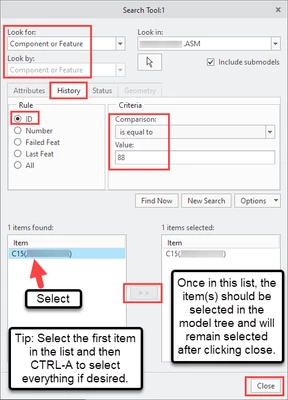
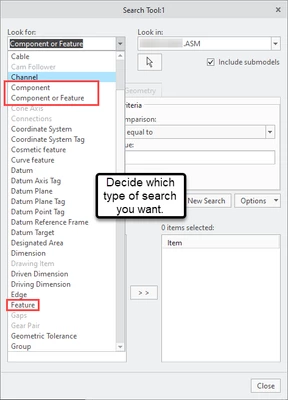
I do not know of a way to do it in one line, but it is possible to use the Search Tool (CTRL-F keyboard shortcut). It's a very useful way to select 1 or many items in the model tree via mapkey. You can uncheck the Include Submodels option if you don't wish to select subcomponents in the search results.


lhoogeveen_0-1669644280616.png


lhoogeveen_2-1669644352580.png


2 replies

17-Peridot
November 28, 2022

Try to use "Find" tool by ID.

17-Peridot
November 28, 2022

I do not know of a way to do it in one line, but it is possible to use the Search Tool (CTRL-F keyboard shortcut). It's a very useful way to select 1 or many items in the model tree via mapkey. You can uncheck the Include Submodels option if you don't wish to select subcomponents in the search results.


lhoogeveen_0-1669644280616.png


lhoogeveen_2-1669644352580.png


14-Alexandrite
November 28, 2022

Ok I'll do some tests.

Thanks