
5-Regular Member
March 18, 2019
Question

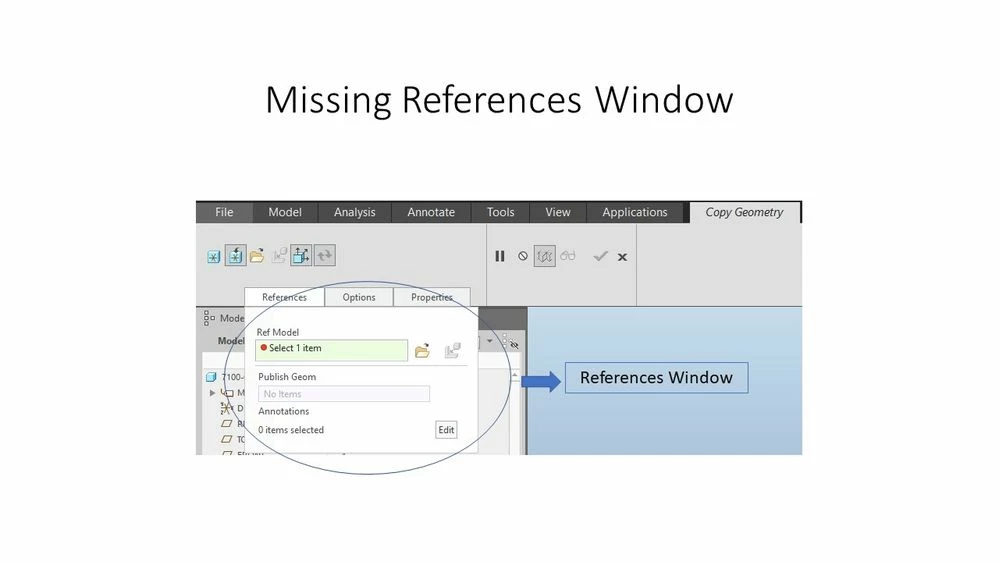
Missing Copy Geometry References Window

  • March 18, 2019
  • 1 reply
  • 1581 views

Something went wrong on my Creo Student version and I lost the copy geometry references window shown in the image below. Now I no longer can choose a published geometry.

What can I do to retrieve it? Is there a setting that I need to pick in-order to retrieve missing window or I need to reinstall Creo again?

Please advise,

Bassam
 

ptc.jpg


1 reply

15-Moonstone
March 18, 2019

You need to gointo File > Options and then to Window Settings. There is a butto92bf4ef1-a52a-4109-b66c-a1e4a37fe1be.pngn to Reset the Panel Position.

byazigi5-Regular MemberAuthor
5-Regular Member
March 19, 2019

It worked...

Thank you,


Bassam