
14-Alexandrite
November 18, 2014
Solved

Model Zoom

  • November 18, 2014
  • 2 replies
  • 4595 views

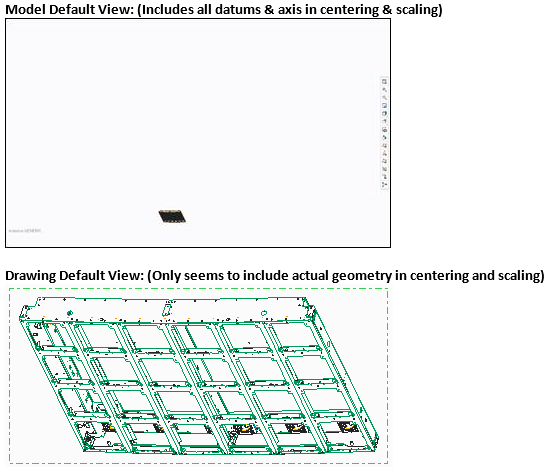
I have a user that is working with models that have curves with very large radii. When he does a refit (zooms so everything fits the screen) the part can sometimes disappear since the axis the radius is based on is so far away. Is there a way to just zoom in on the geometry?
 

Zoom.PNG


This thread is inactive and closed by the PTC Community Management Team. If you would like to provide a reply and re-open this thread, please notify the moderator and reference the thread. You may also use "Start a topic" button to ask a new question. Please be sure to include what version of the PTC product you are using so another community member knowledgeable about your version may be able to assist.
Best answer by ClintWalton

Hi Andy,

I just did a quick search on this and it appears to not be possible.

https://support.ptc.com/appserver/cs/view/solution.jsp?n=CS53181

2 replies

1-Visitor
November 18, 2014

Hi Andy,

I just did a quick search on this and it appears to not be possible.

https://support.ptc.com/appserver/cs/view/solution.jsp?n=CS53181

14-Alexandrite
November 18, 2014

Thanks for the quick reply Clint. I will bring this up at the TC meetings and see what we can make happen.

17-Peridot
November 19, 2014

That's why we have saved view.

I ran into another one yesterday...

I was saving views and as I changed simplified reps, the saved views were at different origins and scales.

All I want is solid geometry to fit on the screen. I also want my saved view to remember screen positions and zoom states.

Does this sound like a worthwhile Product Idea?

1-Visitor
November 19, 2014

Refit To Visible would be nice.

1-Visitor
November 21, 2014

I agree. If it were Refit to Visible, then WYSIWYG and it would be intuitive (something PTC struggles with).

On a similar note, why do the sides of the pick window for Zoom In not represent the edges of the graphics window? Only the top and bottom of the pick window are treated this way. The sides of the pick window represent imaginary edges quite far from the sides of the graphics window (about 3 inches on my screen). Is there something I have set wrong or is this normal for Creo and another possible Product Idea improvement?

1-Visitor
November 21, 2014

It's always been that way.

In all the other graphics programs I've used that allowed window selection, a tall, narrow selection would be sized exactly to the vertical window dimension and a short, wide selection would be scaled to exactly fit the horizontal window dimension. PTC uses some other method. I don't think I ever noticed it fitting either one exactly, but instead scaling the image to 80%, so I window smaller than I want to get the window filled.